
A typical morning: import to dispatch
The 15-minute daily loop, end to end — from a pile of orders to drivers on the road — plus what to do when the day changes at 11am.
Every article in this help center covers one piece. This one plays the whole song: a real morning at a delivery operation running Routerra Teams. Coffee optional, but recommended.
7:45
Orders in
Create today's plan, import the stops, and scan the pins for the one address that landed in a river.
8:00
Optimize
Three drivers, Balanced Mix, twenty seconds — three color-coded routes and one stop in Unassigned.
8:10
Eyeball and dispatch
A sanity pass per route, then Send routes to drivers. Three phones buzz and the plan flips to Approved.
8:15–11:00
The quiet part
The dashboard does the watching. Watch Needs attention, and glance at the live map when something looks late.
11:05
The day changes anyway
A stop nobody answered and a van that won't start: hand the stranded route to another driver, straight from the plan.
17:30
Close the day
Routes complete, failed stops carry reasons and photos, and the Activity log has the trail if anyone asks.
7:45 — Orders in
Today's orders are sitting wherever they always sit — a spreadsheet export, last night's emails, a paper manifest from the warehouse.
Create today's plan
Create plan, named by date. One plan = one day's work. (Create, find, and manage plans)
Import the stops
Paste the list, upload the file, or photograph the manifest — every way in is covered in Import stops. 60 stops land on the map, geocoded.
Scan the pins
One pin sits in a river — a typo'd address. Open it, fix it, done. If an address couldn't be found at all, the stop says so and the sheet offers Did you mean: suggestions (Import and address problems). Two minutes now saves a lost driver at noon.
8:00 — Optimize
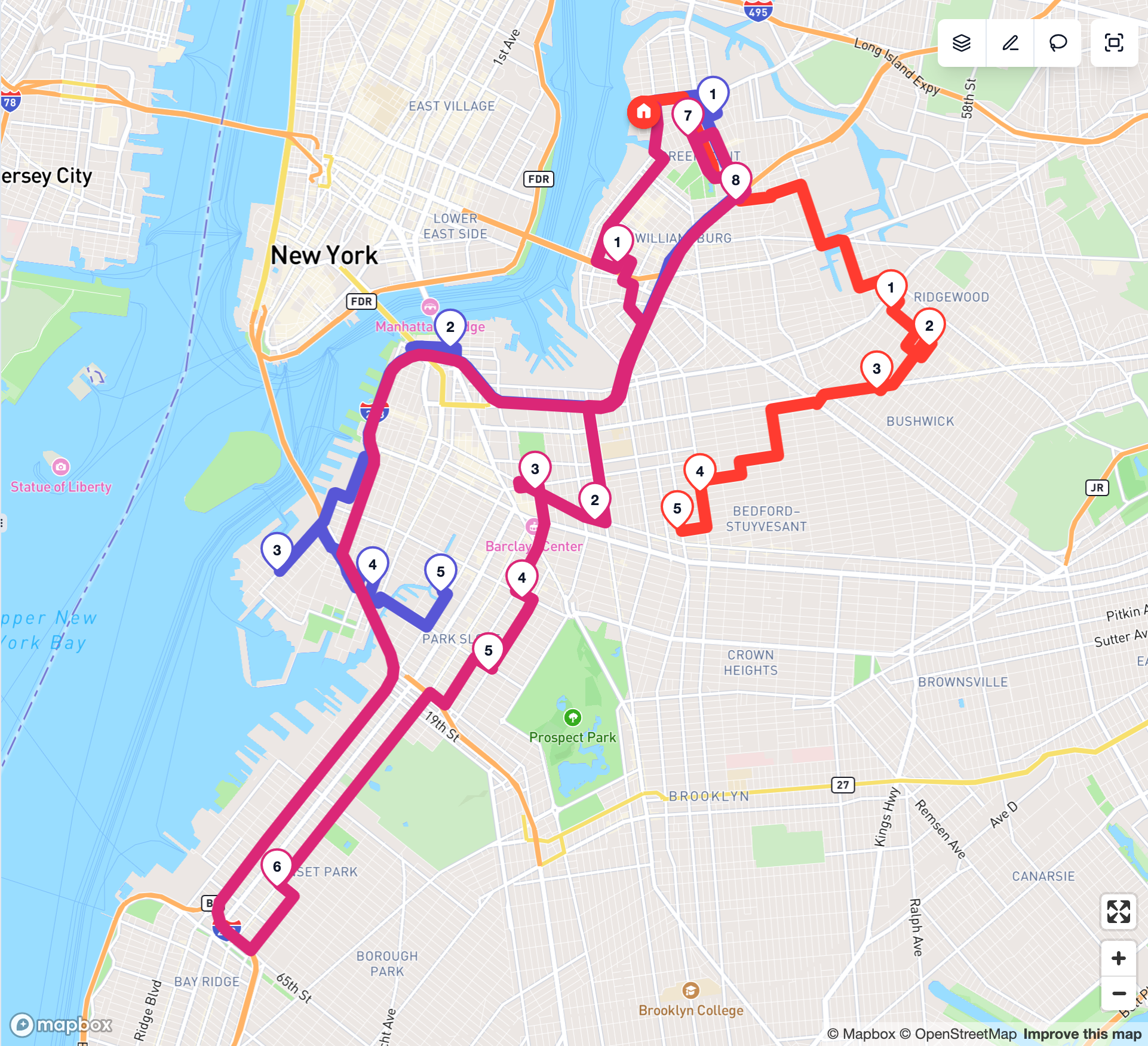
Three drivers today. Assign drivers & optimize, Balanced Mix, go. Twenty seconds later: three routes, each in its own colour, each respecting shifts, vehicle capacity, arrival windows, and the zones you've drawn. One stop lands in Unassigned — its 9:00–9:30 window can't fit anyone's morning. You hand it to the driver passing closest and accept the tight squeeze. (Why stops go unassigned →)
8:10 — Eyeball and dispatch
Quick sanity pass per route: order makes sense, ETAs are humane, nobody's day ends at 9 pm. Then Send routes to drivers. Three phones buzz. Drivers see their stops in order and start navigating — you see the plan flip to Approved. Details in Send routes to drivers.
8:15–11:00 — The quiet part
The dashboard does the watching: delivered counts tick up, ETAs update, and you do other work. The rule of thumb: watch Needs attention — it stays at zero until it doesn't — and glance at the live map when something looks late. With live tracking on, the plan map shows where each driver actually is and how their day is going against the plan. (How live progress works → · Live driver tracking →)
11:05 — The day changes anyway
A customer calls: nobody answered the door at stop 14 — the driver marked it not delivered with a photo of the closed gate (that's proof of delivery working). And driver Marta texts: her van won't start after lunch break.
The mid-day playbook:
- Open the plan — it's sent, but not frozen.
- Marta's whole route goes to someone else: open the More actions (⋮) menu on her route and choose Reassign route. Pick a driver who is free; if they already drive a route in this plan, you can Swap routes instead. The route is not re-optimized, and because the plan is already with drivers, the change appears in their apps immediately.
- Or split her remaining stops: select them on the map or in the list and use Move to driver, pick the other driver and choose Re-optimize Leo's route so the stops land where they fit best. Delivered and failed stops stay put.
- Stop 14 gets a retry later, or moves to tomorrow's plan (When a delivery fails).
Rebuilding the whole plan instead? On a plan that's with drivers, you Revoke from Drivers first, then re-optimize and send again — see Mid-day changes.
17:30 — Close the day
Routes complete. Failed stops have reasons and photos. The Activity log has the audit trail if anyone asks who changed what. A route someone forgot to finish shows up tomorrow under Not closed from previous days on the dashboard, where you can mark it as completed. Tomorrow morning: same loop, 15 minutes, less coffee-dependent every week.