
Assign drivers and optimize
Pick who's driving, choose a distribution strategy, and let the optimizer turn your stops into balanced routes that respect every constraint you've set.
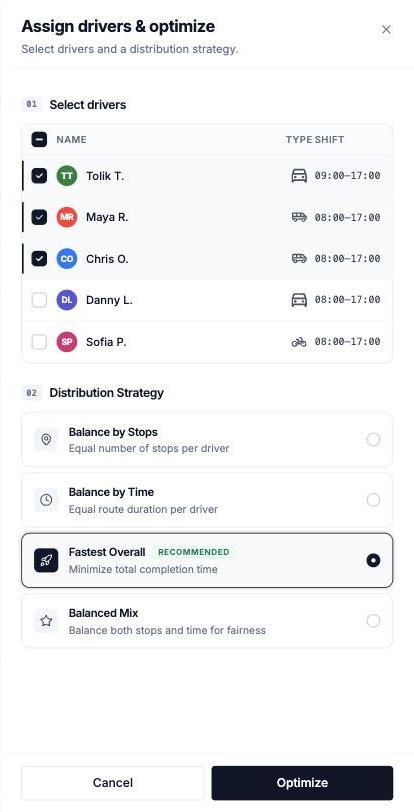
With stops in the plan, one action does the heavy lifting: Assign drivers & optimize. You choose the drivers and a strategy; the optimizer builds one route per driver.
Run an optimization
Press Assign drivers & optimize
On the plan's Stops tab, with at least one stop imported. The Optimize Delivery Plan sheet opens.
Select today's drivers
Only checked drivers get routes. Someone's off today? Leave them unchecked — their profile stays untouched.
Choose a Distribution Strategy
How work is split across drivers — see the table below. Fastest Overall is the recommended default.
Optimize
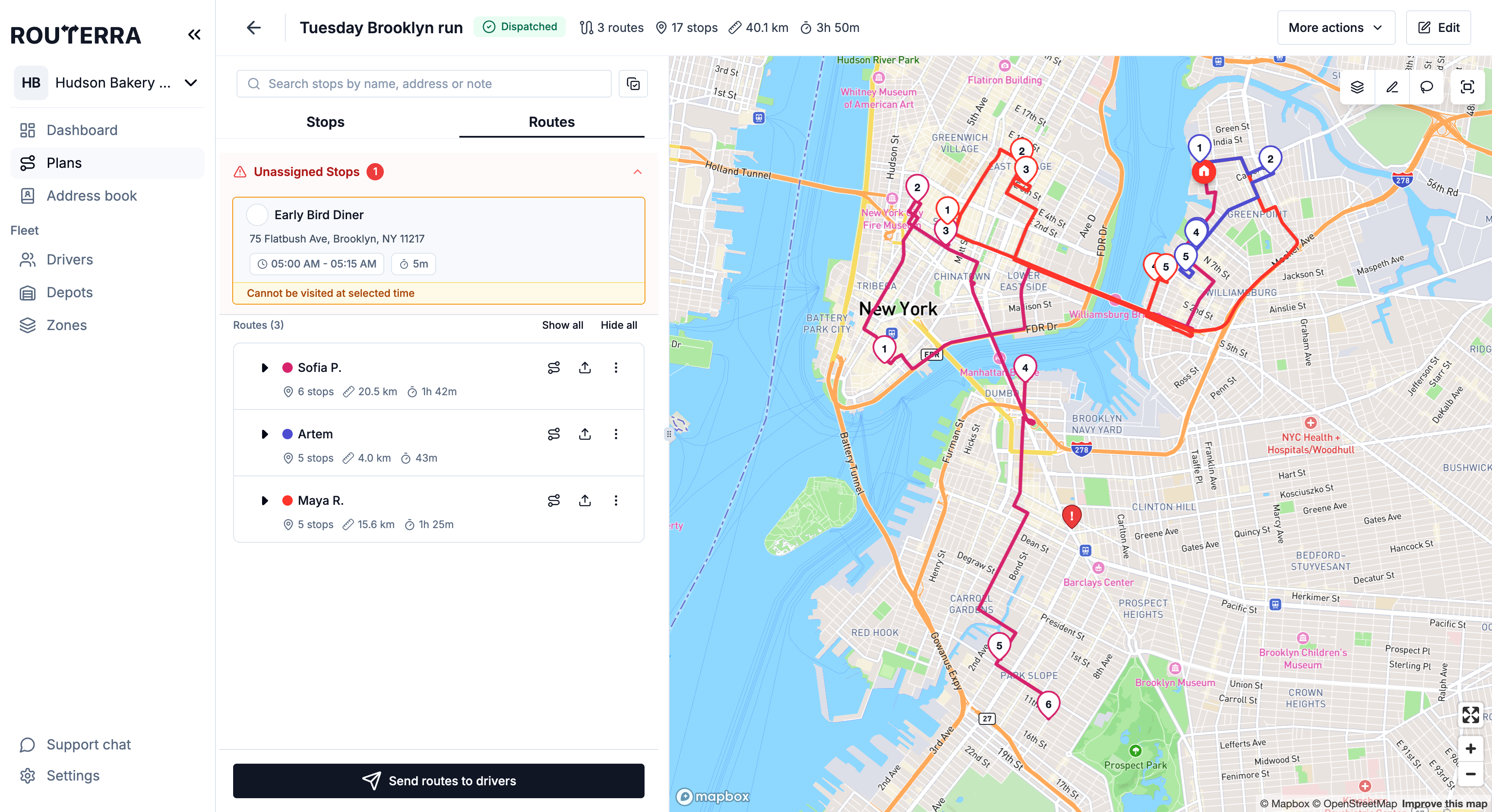
A few seconds later the Routes tab shows one route per driver, in driving order with ETAs. Each route gets its own colour on the plan — even if two drivers picked the same colour, or one driver has two routes.
When the button is greyed out
Assign drivers & optimize can't run while:
- The plan has no stops — hover the button: "Add stops to dispatch the plan".
- A stop's address wasn't found — the stop row reads "Location not found", and the button says "Resolve issues to dispatch the plan". Fix the address or drag the pin (Import and address problems).
- Select multiple stops, the lasso, or Refine is on — finish or close it first.
- The plan is approved — the routes are with the drivers. The Stops tab shows "Routes are with drivers" with Revoke from Drivers instead; pull the routes back to re-optimize (Send routes to drivers).
If a run fails, a Dispatch failed dialog opens with the reason. When routes won't optimize walks through each one.
The four Distribution Strategies
| Strategy | What it does | Pick it when |
|---|---|---|
| Balance by Stops | Equal number of stops per driver | Stops take similar time; you want fairness by count |
| Balance by Time | Equal route duration per driver | Everyone should finish around the same time |
| Fastest Overall | Minimize total completion time | Not sure — this is the recommended default |
| Balanced Mix | Balance both stops and time for fairness | You want an even day without picking count or time |
What the optimizer respects
The result isn't just the shortest path — it honors everything you've configured:
- Per stop: arrival windows, Arrival Priority (Earliest / Latest / Auto), service time, Load, curbside parking side, pre-assigned driver.
- Per driver: vehicle type and Vehicle Capacity, Max Stops, shift start and end (overnight shifts too), start and finish depots, zone restrictions (Allowed / Excluded).
- Roads: Live road data (real traffic), Avoid tolls, and Avoid highways — per-driver switches on the driver's profile (Drivers).
Unassigned stops
Sometimes a stop can't fit anywhere: every allowed driver would break a window, capacity, or shift constraint. It lands in Unassigned Stops instead of silently ruining a route, with the reason on its row — for example "Vehicle capacity exceeded. Reassign stops or increase capacity." From there you can:
- Loosen the constraint that blocked it and optimize again.
- Put it on a route by hand: select it and use Move to driver (Bulk actions on stops), or open the stop and pick a driver in Assign to Driver.
- Drop it to another day.
Adjusting the result
Optimization isn't final — it's a strong first draft. You can move stops to another driver, change a stop's position in its route, hand a whole route to a different driver with Reassign route, or reshape a route's path in Refine mode — see Adjust routes. Then move on to Send routes to drivers.
Optimizing again
Optimizing again is cheap, and delivered and failed statuses survive it. One thing to know: if a driver has changed their stop order in the app, the sheet warns "1 route has a stop order changed by its driver. Optimizing replaces it." See When drivers change their stop order.