
Webhooks
Get a signed JSON POST the moment plans, routes, and stops change — the five events, the HMAC signature, and why each event is delivered exactly once.
Webhooks let your own systems react to what happens in Routerra without polling. Five delivery events are pushed to your HTTPS endpoint as signed JSON. This is the only way to follow a day's progress without polling GET /plans/{planId} — against a rate-limit bucket of 60, polling every plan becomes the bottleneck quickly. Set them up under Settings → Developer → Webhooks.
Endpoints are managed in the dashboard only; an API key cannot create, edit or list them.
The events
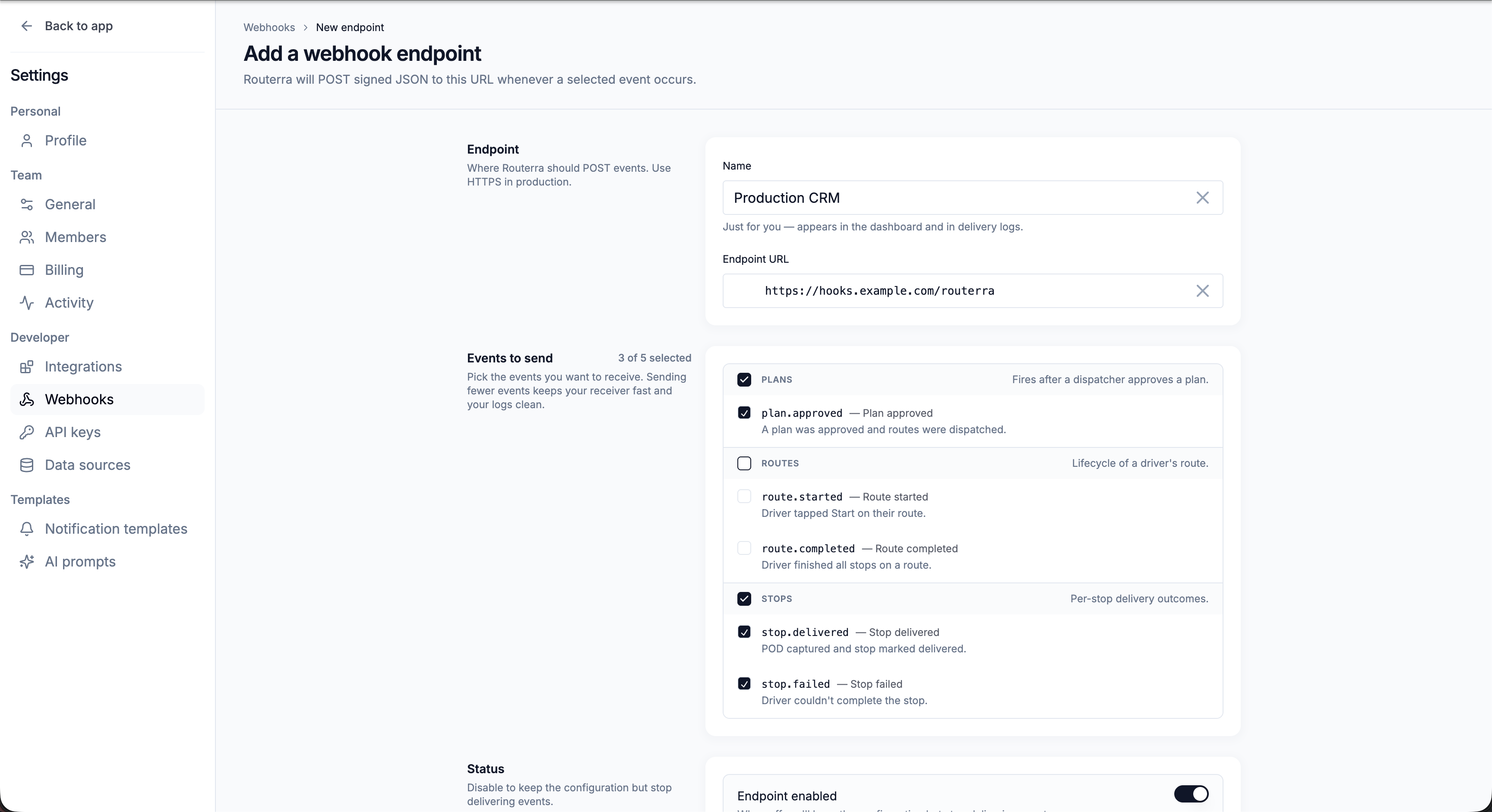
Pick only the events you need — fewer events keeps your receiver fast and your logs clean. They come in three groups:
| Group | Event | Fires when |
|---|---|---|
| Plans | Plan approved | A plan was approved and routes were dispatched |
| Routes | Route started | A driver tapped Start on their route |
| Routes | Route completed | A driver finished all stops on a route |
| Stops | Stop delivered | POD captured and the stop marked delivered |
| Stops | Stop failed | A driver couldn't complete the stop |
Creating an endpoint
Add a webhook endpoint
Press Add endpoint. Give it a Name (just for you — it appears in the dashboard and delivery logs) and an Endpoint URL (use HTTPS in production).
Pick the events to send
Check the events you care about — a counter shows how many of the total you've selected.
Create the endpoint
Routerra starts POSTing signed JSON to your URL whenever a subscribed event occurs.
Verifying the signature
Every payload is signed so you can prove it came from Routerra. Each endpoint has a Signing secret used to sign the payload with HMAC SHA-256 — "Verify it on your receiver to confirm the request came from us." Reveal and copy the secret when you set up your receiver, and check the signature on every incoming request.
The signature arrives in X-Routerra-Signature as two comma-separated parts:
X-Routerra-Signature: t=1789012345,v1=8a3f…
t is the Unix timestamp at which the request was signed, and v1 is the lowercase hex HMAC-SHA256 of the string "<t>.<raw request body>" keyed with your signing secret. Verify against the raw body, before any JSON parsing — re-serializing changes the bytes and the signature will not match.
t, v1 = parse(request.headers["X-Routerra-Signature"])
expected = hmac.new(secret.encode(), f"{t}.{raw_body}".encode(), hashlib.sha256).hexdigest()
assert hmac.compare_digest(expected, v1)
assert abs(time.time() - int(t)) <= 300   # your replay window, not ours
Compare in constant time, and reject a stale t yourself — Routerra is the sender and does not enforce a replay window on your behalf.
Each event is delivered once
Build your receiver accordingly: answer 2xx immediately and do the real work asynchronously, so a slow handler cannot turn into a lost event. For anything you cannot afford to miss, reconcile against GET /plans/{planId} rather than trusting the push alone.
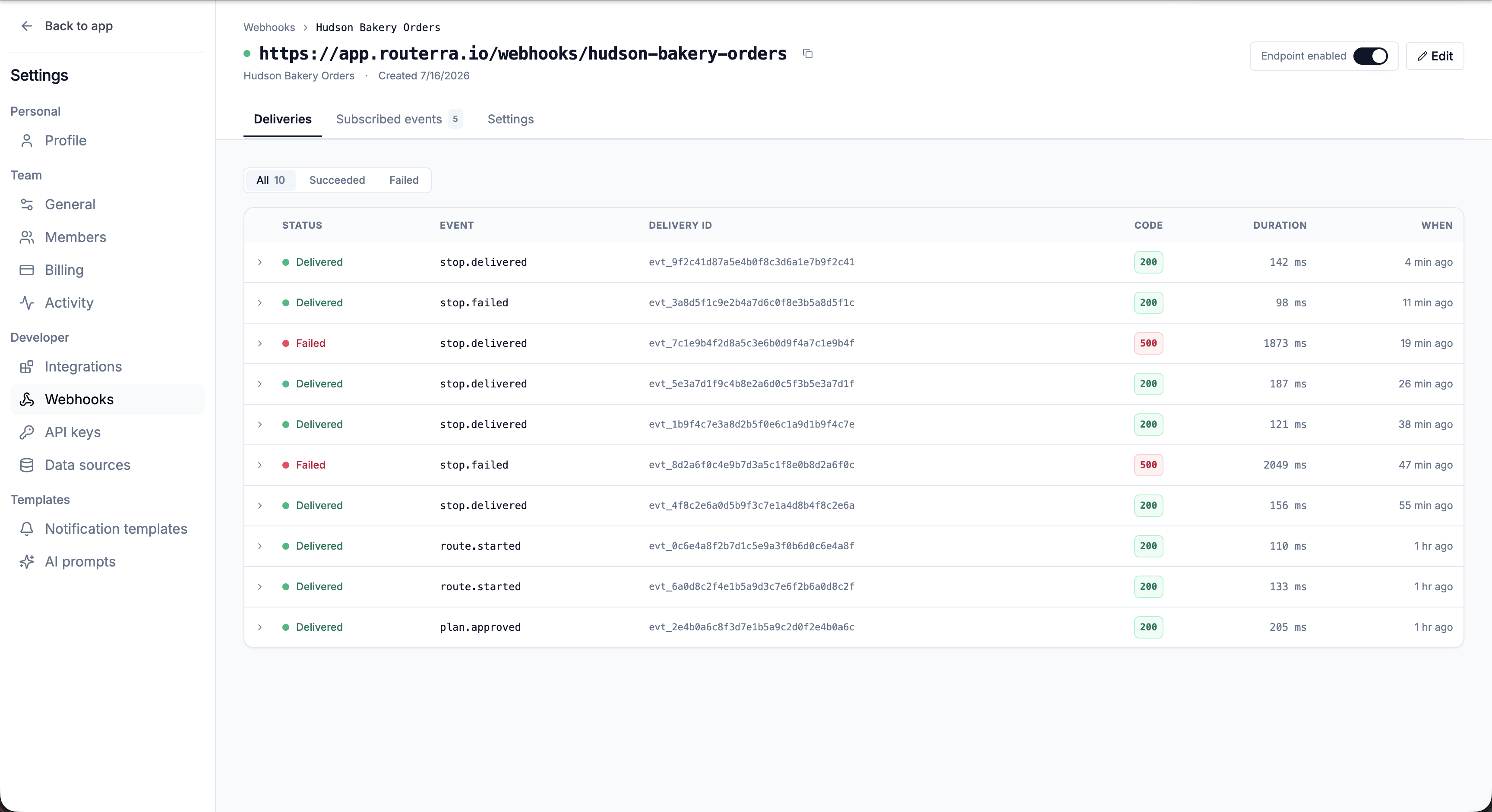
Every attempt is recorded in the endpoint's Deliveries tab, with status (Delivered / Failed), event, delivery ID, response code, duration, and when. You can filter by All / Succeeded / Failed and open any delivery to see the attempt time and error message. History is retained for 30 days.
The id in the body is unique and repeated in the X-Routerra-Delivery header — use it to deduplicate on your side.
Managing an endpoint
- Disable it to keep the configuration but stop delivering events.
- Delete it to stop delivery immediately (delivery history is retained for 30 days).
Webhooks vs one-click integrations
Webhooks are the raw, build-it-yourself path. If you just want SMS, you don't need a webhook — Twilio SMS is a prebuilt integration. Webhooks are for wiring Routerra into your systems (a CRM, a billing system, an ops dashboard).
What's next
- External API overview — driving Routerra from your code
- API keys and the External API — creating and revoking keys
- Connect Twilio for SMS — a prebuilt integration, no webhook required