What to Do When a Driver Calls In Sick Mid-Shift
In this article
A driver who calls in sick at 6:40 a.m., before anything is dispatched, is an inconvenience. You rebalance the plan and go.
A driver who calls in sick at 11:15 a.m., with half a run delivered and a van full of other people's orders, is a delivery route disruption. The clock is running, the stops are getting later, and every minute you spend deciding is a minute you do not get back.
This is the playbook for the second one. It is ordered, it runs on a clock, and it works whether you dispatch from a spreadsheet or from a dispatch tool. One rule sits underneath all of it: stop trying to save the whole day. Save the stops that cannot move, and move the rest on purpose.
The short answer
- 1Establish what is already done. Confirm which stops are delivered and which parcels are still in that van before you decide anything.
- 2Sort the remaining stops into three piles: must happen today, can slip to tomorrow, and must be attempted but can run late.
- 3Move the parcels before you move the stops. A reassigned stop whose box is in the wrong van is worse than no reassignment at all.
- 4Rebalance the must-happen pile onto the nearest driver with capacity, protecting the promised time windows first.
- 5Call the customers whose slot you are about to miss — before they call you.
Deciding costs more than doing. Give yourself ten minutes, commit, and accept that some stops move to tomorrow.
The First Ten Minutes
Minutes 0–2: Get Three Facts, Then Let Them Go
You are on the phone with someone who feels awful. Ask three questions and nothing else:
- Where is the vehicle right now, and are they safe to drive it back to the depot — or does it need to stay where it is?
- Which stop did they last complete? Not "roughly where are you" — which delivery is finished.
- What is still in the van? Number of parcels, and anything perishable, refrigerated, or high-value.
Then let them go. Sick policy, timesheets and whose fault it is are a conversation for tomorrow. Right now those three facts are the entire input to every decision that follows.
Minutes 2–4: Establish Exactly What Is Already Delivered
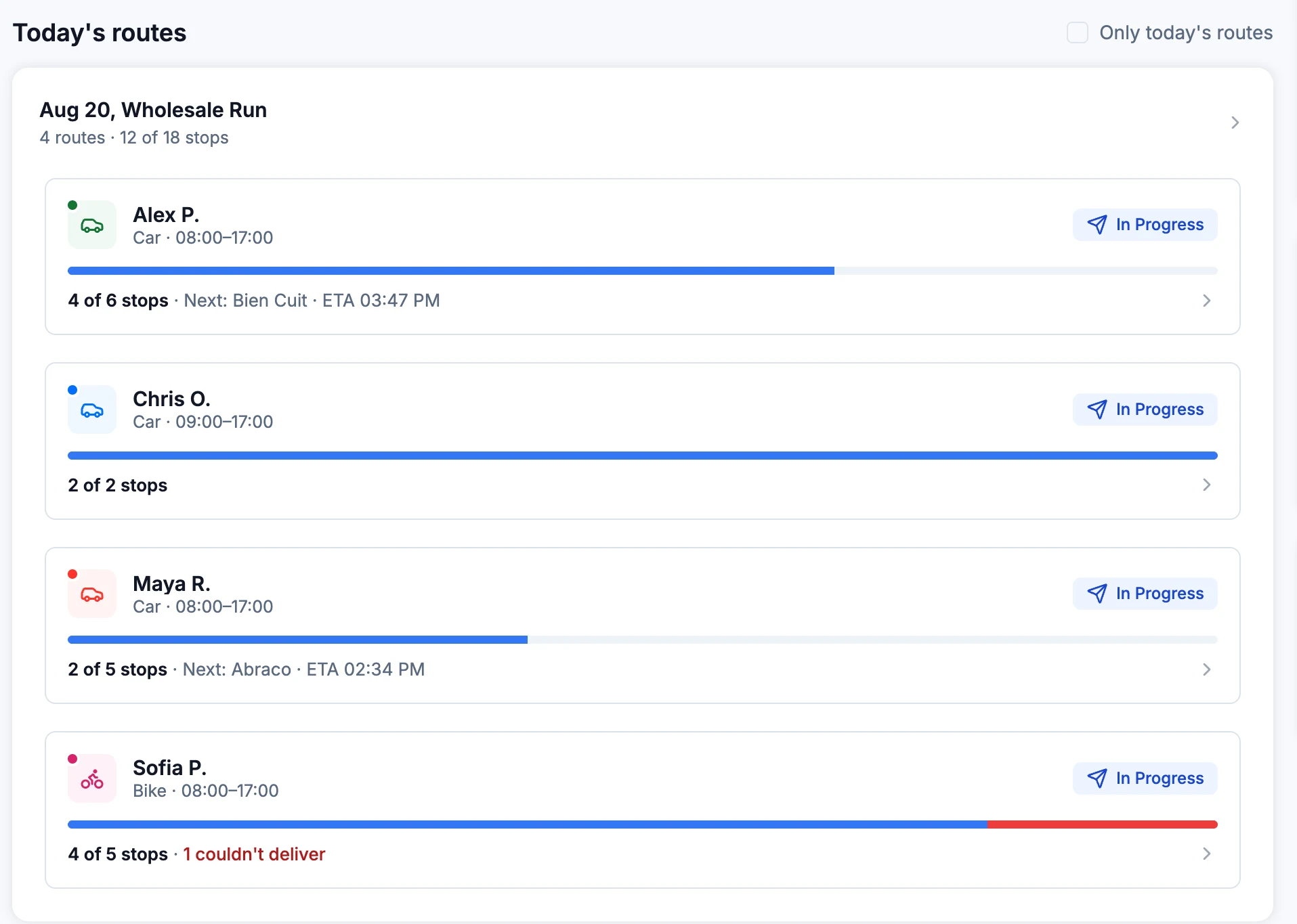
This is the step people skip, and skipping it is what turns one bad hour into two. Before you reassign anything, you need a hard line between done and not done. Reassigning stops that were already delivered means a second driver drives to a door where the parcel is already inside — and a customer who gets a phone call about a delivery they already have.
If you have per-stop delivery statuses, read them. If you do not, get the driver's last completed stop number and treat everything after it as undelivered until proven otherwise.
Minutes 4–7: Triage the Remaining Stops
Sort what is left into three piles — must go today, go today if it is close, go tomorrow. The next section explains how to draw those lines. Do it in three minutes, on paper if necessary, and do not reopen it.
Minutes 7–9: Move the Parcels, Then Reassign the Stops
Reassigning a stop on a screen does not move the box. Decide the physical handoff in the same breath as the routing decision — see below.
Minutes 9–10: Start Calling Customers
Call the customers whose promised window is going to slip before it slips. Not after. This is the cheapest ten minutes you will spend all day.
Sort the Remaining Stops Into Three Piles
You cannot cover a route short-staffed by treating every stop as equally urgent. Triage is the whole job.
Which pile a stop goes in
A written time window, perishable or medical goods, or a business that will not be open tomorrow
Pile 1 — goes today, whatever it costs you to move it.
A soft window, and the stop sits within a few minutes of a route someone is already running
Pile 2 — today only if the geography is already free.
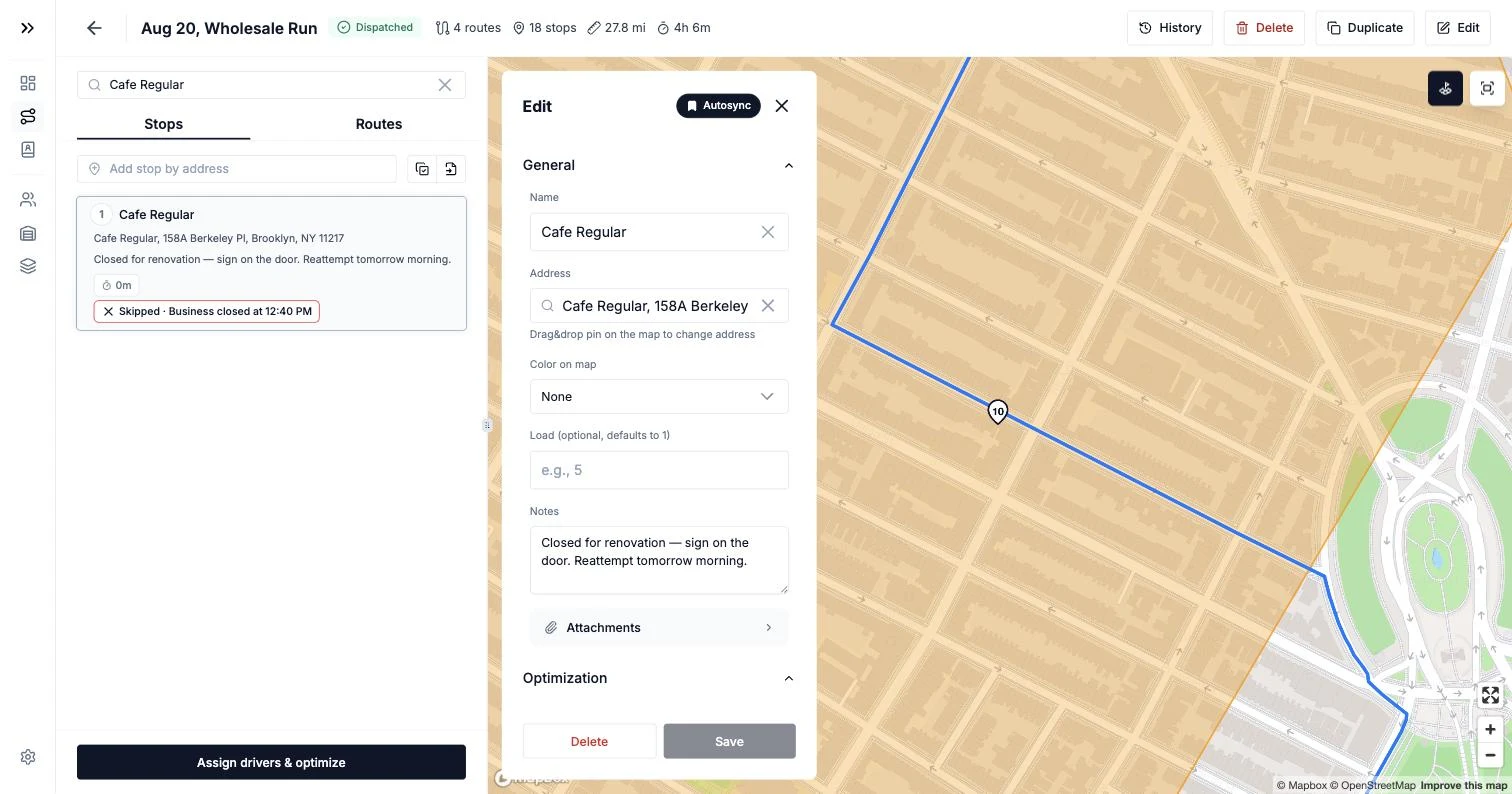
Already failed today with the reason 'business closed'
Pile 3 automatically. Re-attempting this afternoon fails again.
Everything else
Pile 3 — first thing tomorrow, decided now rather than at 4 p.m.
Pile 1 — Must go today. A stop qualifies if any of these are true:
- You promised a hard time window in writing — a booked slot, a contracted delivery, an appointment the customer arranged their day around.
- The goods are perishable, refrigerated, or medical. A pharmacy delivery is not a "tomorrow" stop.
- The recipient is a business that will not be open tomorrow — closing for the weekend, closed Mondays, a market stall that only trades today.
- A failed attempt costs you money: a re-delivery fee, a chargeback, a contract penalty, or a customer who will simply cancel.
Pile 2 — Today if the geography is free. Stops with a soft window that sit within a few minutes of a route another driver is already running. These are cheap to absorb and expensive to force.
Pile 3 — First thing tomorrow. Everything else. Being decisive about pile 3 is what protects pile 1. A dispatcher who tries to rescue all eighteen remaining stops usually misses the four that actually mattered.
Then rank pile 1 by deadline minus drive time, not by distance. The stop with a 1–3 p.m. window that is forty minutes away is more urgent than the stop with a 4–6 p.m. window ten minutes away, even though the map suggests otherwise.
One honest constraint while you rank: check what the receiving driver can absorb. Take your own average service time per stop, add the drive time between them, and see whether the additions push that driver past the end of their shift. If they do, you have not rescued the day — you have moved the failure onto a second driver, and now two customers are angry instead of one.
Stops that already failed for their own reasons belong in the triage too. A structured failure reason tells you which pile a stop goes into without a phone call: business closed means tomorrow morning, not this afternoon.
Move the Parcels Before You Move the Stops
This is the step every "just drag the stops to another driver" article forgets. The goods are in the sick driver's van. Until they are somewhere else, reassignment is theoretical.
You have three options, in ascending order of cost:
- The driver returns the van to the depot and hands over keys and load. Cleanest, if they are well enough to drive and the depot is not across the city.
- A parking-lot transfer. The covering driver meets them, parcels move across, both continue. Fastest when they are already close to each other — and worth doing even if it looks awkward, because it saves two depot legs.
- Someone collects from the depot after the van comes back. Slowest. Budget the return leg, the unload, and the covering driver's detour before you promise anyone a new window.
Whichever you choose, count that time as part of the delivery estimate. A transfer that takes 25 minutes has to come out of the afternoon, not out of thin air. And check the parcel count against your undelivered list at the moment of handover — that is the last cheap opportunity to notice something is missing.
Protect the Time Windows You Promised
There is exactly one way to break the windows on the receiving driver's route, and it is the thing most dispatchers do under pressure: appending the new stops to the end of the run.
Do not append. Re-sequence. Five extra stops dropped at the bottom of a route means a driver crossing back over ground they already covered, and every promised window on that route moving later by the amount of the detour. You did not rescue one route — you damaged two.
When you rebalance routes mid-shift, re-plan the receiving route from the driver's current position forward, with the new stops merged into the existing sequence, and check the arrival estimates against every window that route was already carrying. If a window on the receiving route now breaks, that customer goes on your call list too.
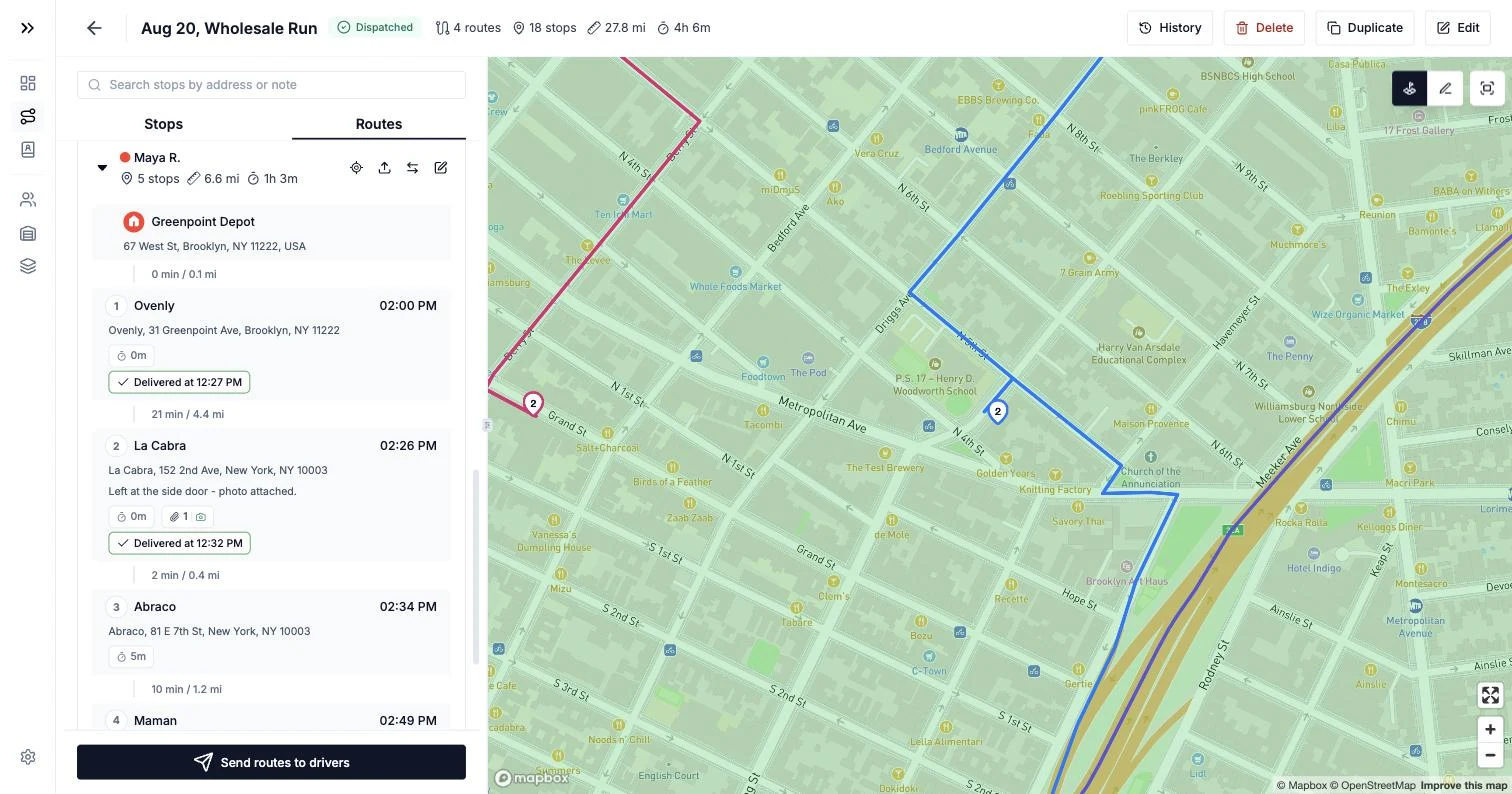
Also: reassignment is not always one-to-one. Splitting four urgent stops across two drivers who are each near one of them is usually cheaper than giving all four to one driver. The question is never "who takes Maya's route" — it is "which stop goes to whom, and does anyone's day still end on time".
What to Tell Customers
You are making these calls yourself. Keep them short and give people a decision to make.
Call, in this order:
- Pile 1 customers whose window will now slip, before the window ends.
- Every pile 3 customer — the ones moving to tomorrow — before the end of their promised window.
- Anyone on the receiving driver's original route whose window moved.
Say this:
"Your delivery was booked for 1 to 3 today. One of our drivers has gone home sick and I'm reassigning his stops. I can get you there between 4 and 6 this afternoon, or first thing tomorrow between 8 and 10. Which works better?"
Two concrete options. Never "sometime later," never "as soon as we can" — those turn one call into three. Say what happened plainly; "a driver went home sick" is an explanation people accept immediately, and it beats a vague "logistics issue."
Then write down what you promised, on the stop itself. The driver who delivers it tomorrow needs to know the agreed window, and you need to know it when the customer calls back.
The Manual Version, Honestly
Most dispatchers reading this will do it with a spreadsheet and a group chat today, so here is that version done properly, without pretending it is fast:
- Call the driver, get the three facts, note the last completed stop number.
- Open the day's sheet. Mark rows 1 through n delivered. Everything below is live.
- Copy the live rows into a new tab. Add a column for the pile — 1, 2 or 3 — and fill it in. Sort by pile, then by window end time.
- Decide the parcel handover and put a time on it.
- Split the pile 1 and pile 2 rows between the drivers you have running, by hand, against a map. Write the insert position for each stop — after which existing stop it goes — rather than just sending an address list.
- Message each receiving driver individually with their added stops, in order, with the windows. Not in the group chat; the group chat is where ownership goes to die.
- Get an acknowledgement from each of them. "Seen" is not an acknowledgement.
- Make your customer calls.
- Put the pile 3 rows at the top of tomorrow's sheet, with their promised windows.
It works. What it costs you is that you are reconstructing state from memory and from one sick person's account of their morning, no one else can see the current picture while you do it, and the receiving drivers will run their added stops in the order you pasted them — which is rarely the order that keeps the windows.
The Same Ten Minutes With a Dispatch Tool
The manual version is slow at exactly two points: knowing what is done, and re-sequencing without breaking anything. That is what dispatch software is for.
You already know what is delivered. Statuses arrive as your drivers work — delivered, or not-delivered with a structured reason — so the line between done and not done exists before the phone rings. Worth being precise about what that is and is not: this is live status visibility, not live GPS tracking. You are not watching a dot move across a map. You are reading a ledger of stops that are closed, stops that failed and why, and stops still outstanding. For this decision that is the better instrument — what you need is which parcels are still in the van, not where the van is standing. Your drivers get to do their job without being watched, and you still get an exact answer in five seconds.
The sick driver's last updates are not lost. If they worked through a basement or a parking garage before calling you, an offline-first driver app keeps their statuses and photos queued on the phone and syncs them when signal returns, so your "already delivered" list closes itself rather than depending on what someone remembers.
Reassignment is two clicks, not a conversation. Hand each remaining stop to another driver right on its card in the plan. No group chat, no address-by-address texting, no two drivers both thinking they own stop 14.
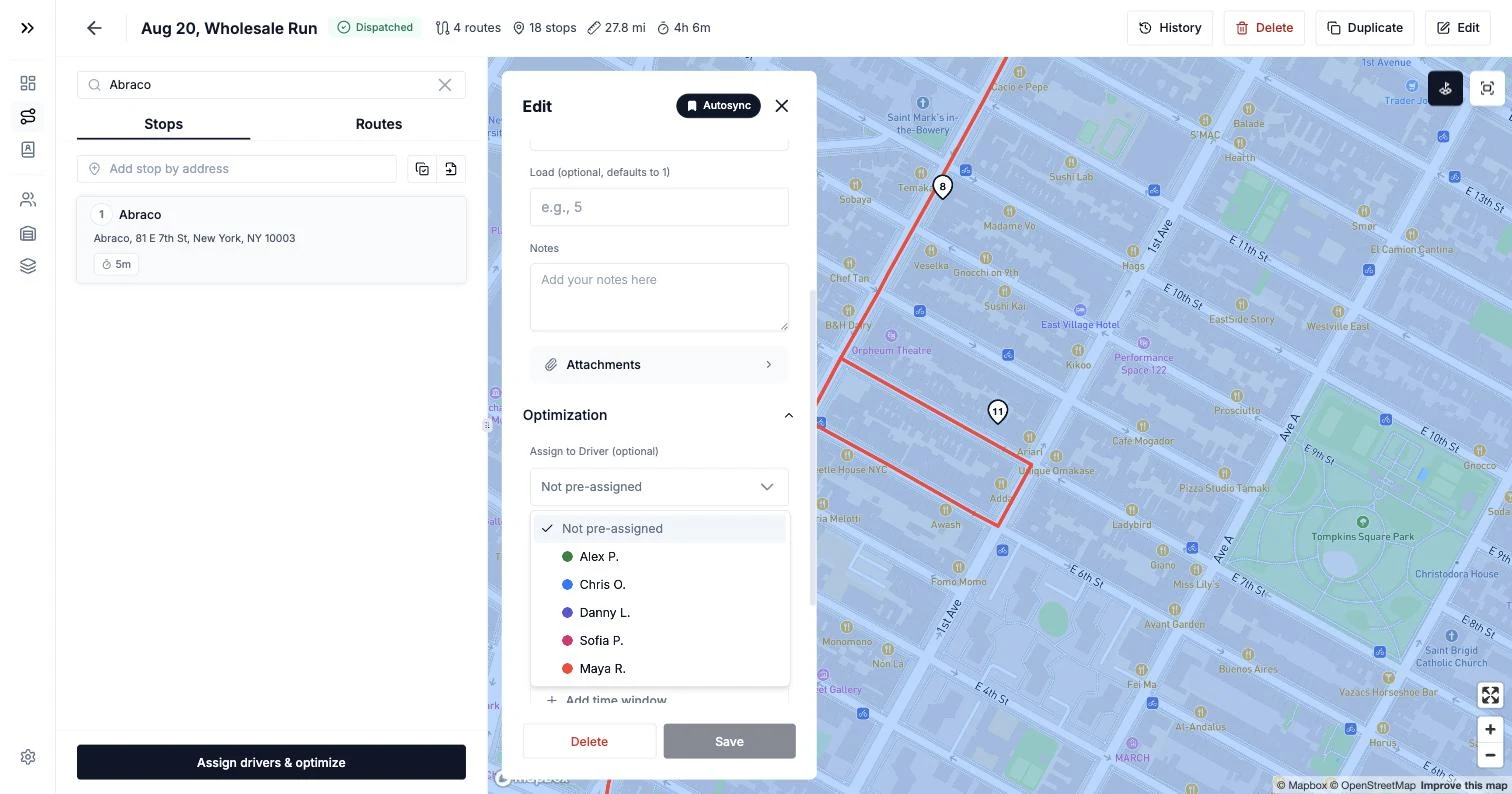
Re-optimize instead of appending. This is the part that saves the afternoon: re-optimizing sequences the rescued stops into one sensible order with fresh ETAs, instead of leaving them dangling at the end of somebody's list.
Re-optimizing a plan that is already partly delivered re-sequences only the stops that are still outstanding. Completed stops keep their status, their timestamps, their notes and their photos — nothing you have already delivered reopens. One thing to know before you hit the button: re-optimizing rebalances all outstanding stops, so other drivers' remaining sequences may shift too — glance over them before you re-send.
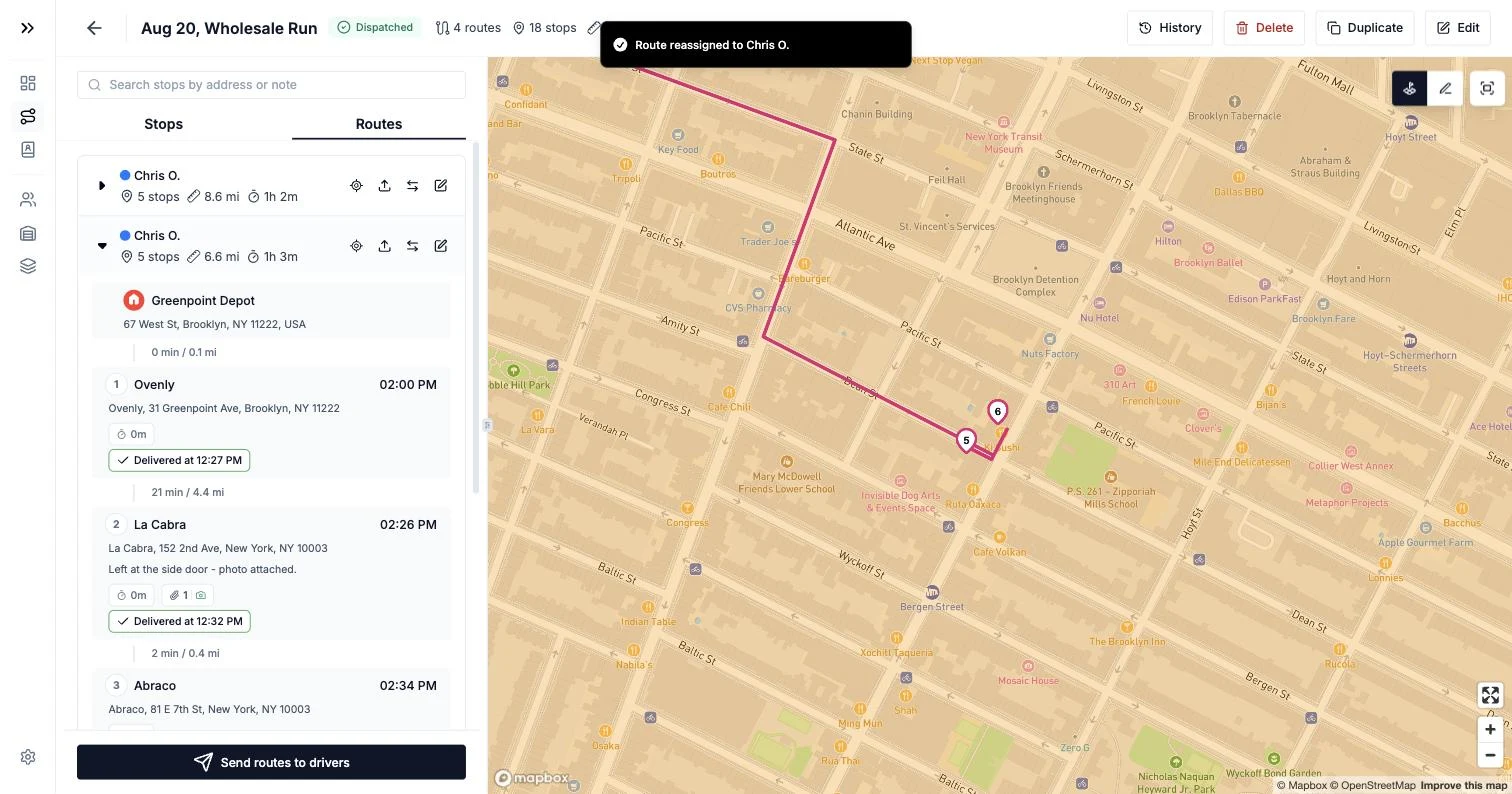
The receiving driver gets the new route on their phone, without a screenshot and without you reading addresses down a phone line. After you edit a dispatched plan, send it again so the updated routes reach the drivers' apps.
You can hand a whole route over, not just individual stops, when the covering driver is taking the entire remainder of a run — one reassignment action moves the route with its stop order, timings and path exactly as planned.
Pile 3 becomes tomorrow's plan, not a sticky note. Get the deferred stops into the next day's plan with the windows you promised, so the morning after the disruption starts from a real list.
And the record holds. The plan's activity log keeps who approved, reassigned and re-sent what, and when — so when someone asks next week why a route moved, the answer is in the system rather than in your memory.
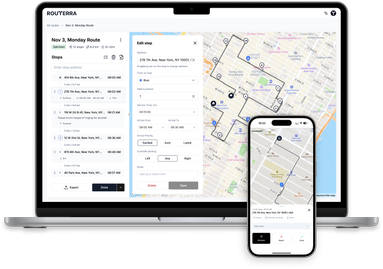
Routerra Teams does this piece: statuses and structured failure reasons as they happen, proof-of-delivery photos per stop, stop-level reassignment, re-optimization with your zones, windows and capacity intact, and an offline-first driver app so a dead signal never costs you the record. It is $25 per driver seat per month, or $20 per seat per month billed annually, with a 7-day free trial — and seats can be added or removed as your fleet changes.
The Harder Version: The Driver Who Never Calls
The sick call is the easy case. The hard one is silence: half a run delivered, then nothing since 12:40. No answer, no message.
Do not panic at a thirty-minute gap. Loading docks, basements, lunch, a long wait at a business reception — dead air is usually just dead air, and an offline app will sync a batch of updates the moment the driver walks back into signal. Run a ladder instead:
- 20 minutes with no new completed stops: call. If it rings out, text.
- 30 minutes: call again, and message any other driver working the same part of town.
- 40 minutes: call the business or customer at the next expected stop and ask whether a driver has arrived. This is the single most useful call in the sequence — it converts silence into a fact.
- 60 minutes: treat the route as stopped. Start the ten-minute playbook above using your delivery record as the source of truth, and keep trying the driver in parallel.
Two things run alongside the routing. First, welfare: if there is any chance the driver is hurt rather than gone, that stops being a dispatch problem immediately, and the last confirmed delivery is the most specific location information you have. Second, the vehicle and the goods: recovering the van, the keys and the undelivered parcels is the priority over any stop on it.
That is also what to do when a driver quits mid-route and simply walks away. The stops are the least of it:
- Recover the vehicle, keys and load. Send someone to the last confirmed stop if that is your best lead.
- Reconcile the parcels against your list of undelivered stops before the van is unloaded, so anything missing is noticed today rather than next week.
- Revoke access. Remove the driver's seat or access so tomorrow's routes are not dispatched to a phone you cannot get back.
- Only then triage the remaining stops with the same three piles.
Per-stop proof and a stop-by-stop record are what make steps 1 and 2 possible. Without them you are asking a departed employee what they delivered.
Make the Next One Boring
The gap between a chaotic disruption and a routine one is almost entirely preparation:
- Name a backup for every shift. "Whoever's free" is not a backup. One named person per day who knows they are it.
- Keep a spare key and depot access sorted so a stranded van is a twenty-minute problem, not an afternoon one.
- Store time windows as data, not in your head. You cannot triage windows you have to remember.
- Leave slack in the plan. If every route is built to end at the last minute of the shift, you have no capacity to absorb anything — and mid-shift reassignment becomes impossible arithmetic.
- Know your seat position. If you cover gaps with a floating driver, know how quickly you can put them on the road. Seats can be added or removed as needed, so a spare hand is a configuration change rather than a procurement exercise.
- Write the playbook down and pin it where dispatch happens. The whole point of a playbook is that it works on a bad day, when nobody is thinking clearly.
The Bottom Line
When a driver calls in sick mid-shift, work in this order: three facts from the driver, a hard line between delivered and not delivered, three piles, the parcels, the re-sequence, then the phone calls. Ten minutes, in that order, every time.
The two steps that decide how the afternoon goes are the ones that are hardest by hand — knowing precisely what is already done, and merging the rescued stops into another route without breaking the windows it was already carrying. If you would rather those two took minutes than half an hour, look at Routerra's dispatch software for small fleets: live status visibility, structured failure reasons, stop-level reassignment with re-optimization, and an offline-first driver app. Pricing is $25 per driver seat, and you can start a 7-day free trial before the next driver calls in sick. Courier fleets running dense multi-drop days — the ones where a mid-shift reassignment means moving forty stops, not five — are covered on the courier route planner page.
Frequently Asked Questions
A driver called in sick mid-shift — what do I do first?
Get three facts from the driver before you hang up: where the vehicle is, which stop they last completed, and what is still in the van. Then establish exactly which stops are already delivered, because every decision after that depends on it. Only once you know what is done do you decide what gets reassigned and what gets pushed to tomorrow. Do not start texting other drivers first — you will reassign stops that are already delivered.
How do I decide which stops to reassign and which to push to tomorrow?
Sort the remaining stops into three piles. Pile one must go today: hard time windows you promised in writing, perishable or temperature-controlled goods, medical deliveries, and businesses that will not be open tomorrow. Pile two goes today only if it is close to a route already running. Pile three goes first thing tomorrow. Being decisive about pile three is what protects pile one — trying to save every stop is how you miss the ones that mattered.
How do I reassign a route to another driver without breaking their time windows?
Never append the extra stops to the end of the receiving driver's route. Added stops have to be re-sequenced against the whole route, so the new stops slot in where they fit and the existing promised windows survive. In a dispatch tool you move the stops to the other driver and re-optimize that route, and the updated sequence lands on the driver's phone. By hand, you have to re-plan the receiving route from its current position, not just paste addresses at the bottom.
What do I tell customers when a driver goes home sick?
Call before the promised window ends, not after it is missed. Give two concrete options — a new window today or a first-thing-tomorrow slot — and let the customer choose. Never say 'sometime later.' A missed window you warned about is a reschedule; a missed window you did not warn about is a complaint. Write down what you promised, on the stop, so whoever delivers it tomorrow knows what was agreed.
What do I do when a driver quits mid-route or stops answering?
Treat it as two separate problems. The vehicle and the goods come first: recover the van, the keys, and the undelivered parcels, and revoke the driver's access so tomorrow's routes do not go to a phone you cannot get back. The stops come second, and follow the same triage — establish what was actually delivered from your per-stop records rather than from memory, then reassign or defer the rest. If the driver may be hurt rather than gone, that is a welfare call, not a dispatch decision.
Can I see where my driver is when they stop responding?
Routerra gives you live status visibility, not live GPS tracking. You see each delivery update as it happens — delivered, or not-delivered with a structured reason — plus proof-of-delivery photos attached to each stop. For a mid-shift disruption that is the information you actually need: which stops are closed and which parcels are still in the van. Your best known position for the vehicle is the last stop that was confirmed delivered.