
Delivery Route Planner for Couriers and Independent Drivers
The best way to plan a delivery route is to put every stop into a route optimizer, let it calculate the fastest stop order, and then navigate leg by leg in the map app you already use.
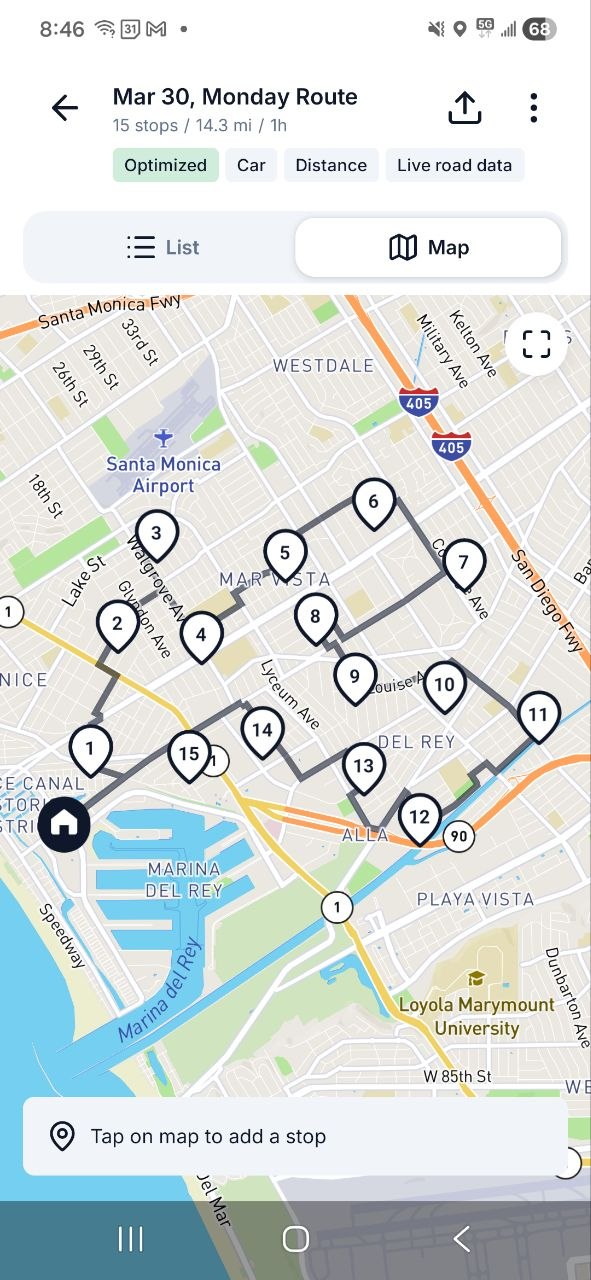
Sorting stops by hand works for a handful of addresses, but past about ten stops an optimizer finds a faster sequence than manual planning. Routerra does exactly that: add stops by typing, pasting a list, uploading a spreadsheet, or photographing your stop list — then tap Optimize and drive the order it returns.
Free for up to 20 stops per route — no credit card


How to Plan a Delivery Route in 4 Steps
Add your stops
Type addresses, paste a list, upload a CSV, Excel, or PDF file, or snap a photo of a paper manifest — AI import extracts the addresses for you.
Set start and end
Start from your depot or pickup point and choose where you want to finish — including near home.
Optimize the order
Routerra reorders your stops for the fastest drive, with traffic-aware routing and support for arrival time windows.
Drive stop by stop
One tap opens each leg in Google Maps, Waze, or Apple Maps. Mark stops finished or cancelled as you go.
The Money Math of Your Delivery Day
Quick Savings Calculator
Move the slider to match your typical route
Get detailed monthly & annual savings

Stop Wasting Hours Every Week
Manual route planning takes 1+ minute per stop. That's hours of lost earning time each week that you'll never get back.

Earn More Per Hour
Every minute saved on planning means more time for deliveries. Plus, optimized routes = less fuel costs and vehicle wear.

ROI in Days, Not Months
Most drivers see 10-20x return on their Routerra subscription within the first month. Start saving today.
Built for Solo Delivery Drivers and Couriers
A faster stop order
Traffic-aware optimization cuts zigzags and backtracking, so you spend your shift delivering instead of crossing town twice.
No typing 40 addresses
Import your whole stop list at once — from text, a spreadsheet, or a photo — and review the extracted stops before you optimize.
Finish near home
Set your preferred end location so the optimized route moves you toward home instead of stranding you across town.
Track every drop
Mark stops finished or cancelled and add notes as you drive, so you always know what was delivered.
How Delivery Route Planners Compare
Google Maps caps a route at about 10 destinations and keeps them in the order you typed them. Dedicated planners remove the cap and optimize the order — here is how the popular options line up.
| Planner | Free plan | Paid plan | Platforms | Notes |
|---|---|---|---|---|
| Routerra | 20 stops and 5 optimizations per day (30 per month) | Pro $14.99/mo ($9.99/mo billed annually) — 200 stops per route | Web, iOS, Android | AI import from text, CSV/XLSX, or a photo of your stop list; traffic-aware optimization |
| Circuit | 10 stops per route | Premium $20/mo — unlimited stops | iOS, Android | Polished mobile app; integrates with Google Maps and Waze |
| Road Warrior | 8 stops per route | Pro $14.99/mo — 120 stops per route | iOS, Android | Simple app with syncing between devices |
| RouteXL | 20 addresses per route | €35/mo — 100 stops; €70/mo — 200 stops | Web | Web only; list import that needs full, precise addresses |
| Google Maps | About 10 destinations per route, including start and end | — | Web, iOS, Android | No automatic stop reordering — you drag stops into order yourself |
Sources: competitor plans, limits and prices as recorded in Best Route Planners for Delivery Drivers (June 2025), RouteXL vs Routerra (September 2025) and How to Add More Than 10 Stops in Google Maps (August 2025). Vendors change their plans without notice — check each vendor's site before you decide.
Weighing Routerra against RouteXL specifically? See the full Routerra vs RouteXL comparison — stop limits, prices, and platforms side by side.
Drivers Who Do This Every Day
“I cover a large area of South Carolina and have a lot of stops in each area. The app allows me to structure my days in an efficient order that would be difficult to structure myself. A key factor in productivity.”
Jonathan West
Delivery Professional, South Carolina · via email
“The App has been extremely accurate and effective so far. Thank you for your rapid response.”
Tommy Bellomy
Delivery Driver · via email
Running a fleet? This page is for solo drivers. If you dispatch routes to multiple drivers, Routerra Teams handles multi-driver planning and dispatch. See the courier route planner for teams
The Full Feature List
Every Routerra feature and the plan it ships in, stated plainly. Where something works through another app or has a limit, the note says so.
- Free & Pro
Route Optimization
One tap reorders your stops into the fastest drive.
- Free & Pro
Multi-Stop Planning
Up to 20 stops per route on Free, up to 200 on Pro.
- Free & Pro
Address Book
Save up to 1,000 recurring stops for reuse.
- Free & Pro
Drive Mode
Stop-by-stop driving screen with Navigate, Complete, and Skip on every stop.
- Free & Pro
Turn-by-Turn Navigation
Via hand-off: each stop opens in Google Maps, Waze, or Apple Maps — not an in-app engine.
- Free & Pro
Offline Mode
Planned routes keep working when there's no signal.
- Free & Pro
Route Export & Sharing
Export CSV or PDF, or share a route link.
- Free & Pro
Bulk List Import
Paste a list of addresses and add them all at once.
- Free & Pro
Route Statistics
See total distance, drive time, and stop count for every route.
- Free & Pro
Route Reversal
Reverse your stop order in one tap — great for return trips.
- Free & Pro
Duplicate Route
Copy any route to reuse it the next day with the same stops.
- Free & Pro
Dark Mode
A dark theme on mobile for comfortable night driving.
- Free & Pro
Voice Input
Add stops by voice on mobile — speak addresses hands-free.
- Free & Pro
Bulk Stop Actions
Select multiple stops to complete, skip, or delete them at once.
- Pro
Time Windows
Set arrival windows per stop — the optimizer plans around them.
- Pro
Stop Priority
Mark stops as high-priority so they're served first.
- Pro
Bulk Import (CSV / Excel / PDF)
Upload a spreadsheet and your stops land in one list.
- Pro
OCR Import (Photos & Camera)
Snap labels or screenshots; the addresses are read for you.
- Pro
AI-Powered Stop Extraction
AI pulls addresses out of pasted text, manifests, and images.
- Pro
Saved AI Prompts
Save and reuse AI prompts for faster repeat imports.
- Pro
Split Route
Divide a long route into smaller sub-routes — web only.
- Pro
Traffic-Aware Optimization
Real-time traffic is factored into the optimized order.
- Teams
Proof of Delivery
Drivers capture photos and notes at each stop. Not part of Free or Pro.
- Teams
Live Progress Tracking
Status-based: you see stops complete in real time, not a GPS dot on a map.
- Teams
Customer Notifications
Automatic SMS and email updates to your customers.
- Teams
Multi-Driver Dispatch
Plan for the whole fleet and send each driver their route.
- Teams
API & Webhooks
REST API plus signed webhooks for your own systems.
- Teams
Data Source
Connect your own system and pull stops directly into a plan.
- All plans
Web, iOS & Android Apps
The web app runs at app.routerra.io; native apps on both stores.
- All plans
Multi-Language Support
Available in English, Spanish, Portuguese, French, German, Italian, Polish, and Ukrainian.