
Routerra vs RouteXL: Which Route Planner Fits How You Work?
Both planners optimize up to 20 stops for free. RouteXL is a web-only tool built for planning at a desk — no native mobile app, paid tiers at €35/month for 100 stops or €70/month for 200. Routerra is built around the driver's phone: iPhone and Android apps, AI import from a screenshot or spreadsheet, traffic-aware optimization, and one-tap handoff to Google Maps, Waze, or Apple Maps — 200 stops per route on Pro at $14.99/month ($9.99/month billed annually).
In short: if you plan on a desktop and export the order to a GPS device or a printout, RouteXL does the job. If you drive the route yourself with a phone on the dash, Routerra is built for exactly that day.
Free for up to 20 stops per route — no credit card.


Routerra and RouteXL, Side by Side
The limits, prices, and platform facts — as published by each product, checked August 2026.
| What matters | Routerra | RouteXL |
|---|---|---|
| Free plan | 20 stops per route, 5 optimizations a day (30 a month) | 20 stops per route, unlimited routes a day (fair use) |
| Paid plans | Pro $14.99/mo, or $9.99/mo billed annually — 200 stops per route | €35/mo (100 stops) or €70/mo (200 stops); day passes €5 / €10 |
| Platforms | iPhone and Android apps, plus web | Web browser only — the “apps” are the website saved to your home screen |
| Stop import | AI import from a screenshot or photo, CSV / Excel / PDF, paste, type | Paste an address list — one full address per line |
| Traffic | Traffic-aware optimization | No live or forecasted traffic |
| Driving the route | One tap opens each stop in Google Maps, Waze, or Apple Maps; mark stops completed as you go | Print, share, or download GPX / ITN / CSV / KML for GPS devices |
Sources: RouteXL plans, stop limits, import and export details as published on routexl.com/blog/pricing and docs.routexl.com, checked August 2026. Routerra limits and prices are current on our pricing page. Vendor prices change — check theirs before you buy.
When RouteXL Is the Better Fit
RouteXL has been planning routes on the web for years, and for some workflows it is genuinely the right choice.
You export to a GPS device
RouteXL downloads the optimized order as GPX, ITN, CSV, or KML for TomTom and Garmin units. Routerra hands stops to phone navigation apps instead and doesn't produce GPS-device files.
You need one big route, once
RouteXL sells day passes — €5 for 100 stops, €10 for 200 — so a one-off oversized route doesn't require a subscription.
You plan many small routes at a desk
RouteXL's free tier allows unlimited routes per day (fair use) at up to 20 stops each — handy for a dispatcher who prints or shares the order and never drives it from a phone.
Where Routerra Pulls Ahead: the Day Behind the Wheel
RouteXL's route ends as a printout or a file. Routerra keeps going: import, optimize, and drive the route from the phone that is already on your dash.
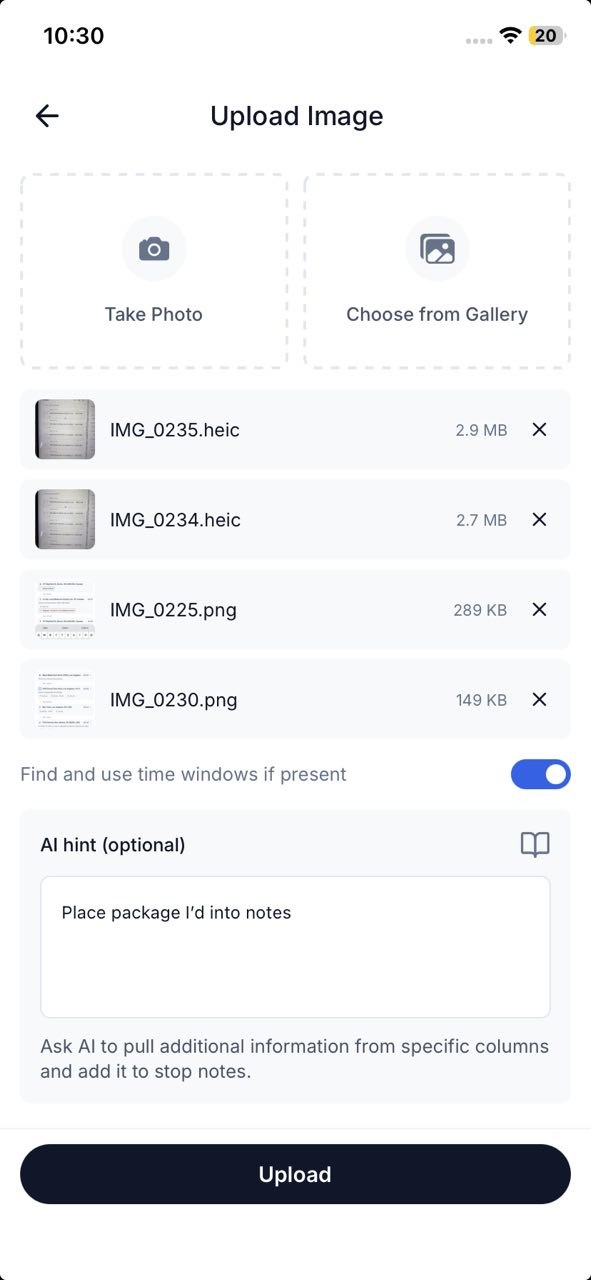
Import from anything
AI import reads stops from a screenshot, photo, CSV, or pasted text — no one-address-per-line cleanup.
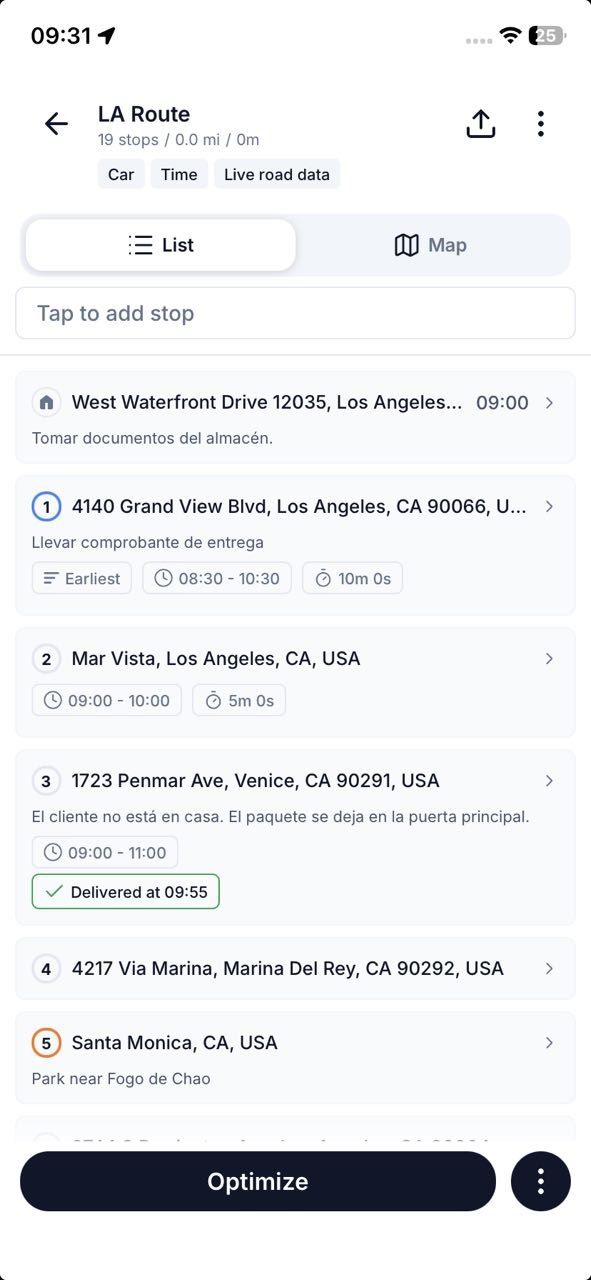
Optimize with traffic
One tap reorders the whole list into the fastest drive, traffic included — up to 200 stops on Pro.
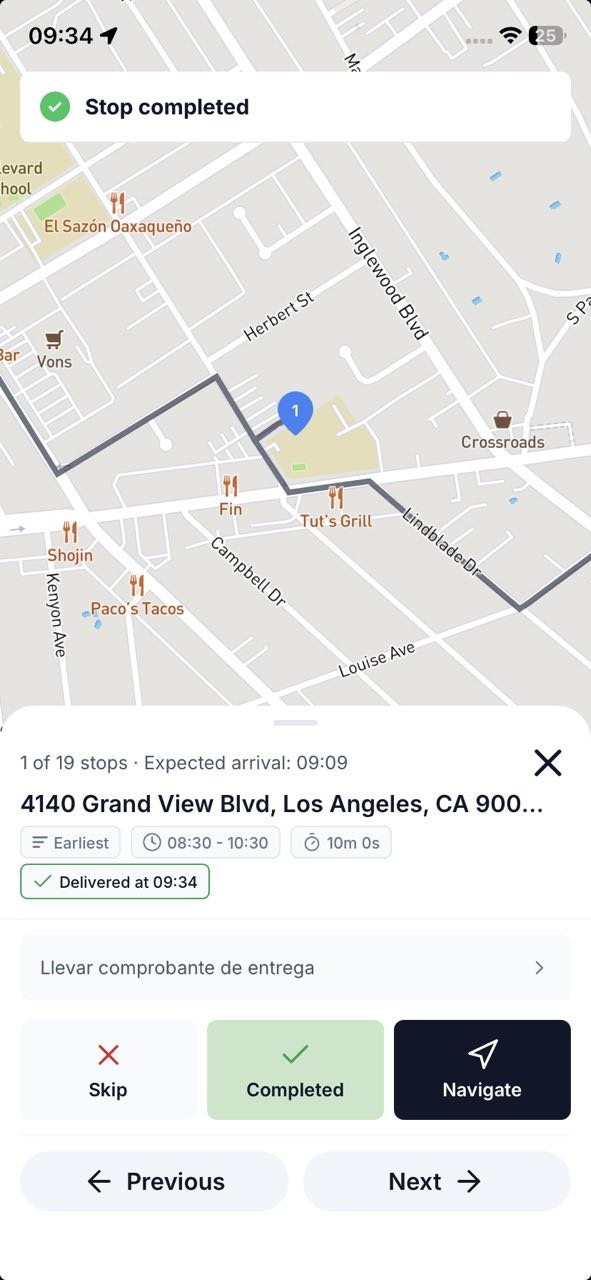
Drive with your navigation
Each stop opens in Google Maps, Waze, or Apple Maps with one tap; mark it completed and roll on.
What Drivers Tell Us
“The best routing platform I've found by far. The customer service and constant drive to improve really set Routerra apart. Every update has made the program better than it already was.”
Todd Ortowski
Routerra User · via email
“I cover a large area of South Carolina and have a lot of stops in each area. The app allows me to structure my days in an efficient order that would be difficult to structure myself. A key factor in productivity.”
Jonathan West
Delivery Professional, South Carolina · via email
Routerra vs RouteXL: Common Questions
Want the long-form version? Read RouteXL vs Routerra in depth or the wider RouteXL alternatives roundup.