How to Prove a Delivery Happened When the Customer Says It Never Arrived
In this article
A customer calls on Thursday about an order you delivered on Monday. It never arrived. You open your system and there it is: delivered, 11:42, Monday.
You tell them that. They tell you it never arrived.
And now you're stuck — because you have a status, and they have a story, and a status is not evidence.
What a delivery record has to contain
- 1A photo taken at the door that shows the parcel, where it was left, and something that identifies the address — a house number, a unit door, a shopfront.
- 2A precise timestamp, not a date. "Monday" is not a time; 11:42 is.
- 3A link to the specific order, so the photo cannot be confused with any other drop on that street.
- 4A structured reason whenever a delivery fails, chosen from a fixed list rather than typed into a free-text box.
- 5A record of who set that status and when, so the entry cannot be quietly changed after the complaint arrives.
Anything short of this is a claim. A claim loses to a confident customer, and it loses to a card issuer almost every time.
The fix isn't arguing better. It's building a record at the door that makes the argument unnecessary. This guide covers what actually counts as proof of delivery, why "marked delivered" doesn't, and how to handle the three disputes you'll actually see: left at the door, a neighbor took it, and the business was closed.
"Marked Delivered" Is a Claim, Not Evidence
Here's the uncomfortable structure of the situation. When your driver taps Delivered, what gets written down is: our employee asserts this was delivered. That's your side of the story, stored in your own database, entered by the person whose performance it reflects.
The customer's claim is the parcel is not here. Notice these two statements don't actually contradict each other. A parcel can be genuinely delivered and genuinely not here — left at the wrong door, taken off the step, accepted by someone who forgot. So showing them the status doesn't refute anything. It just repeats the thing they're disputing, in a nicer font.
The same logic applies to a carrier's tracking scan, which is why "but the tracking says delivered" so rarely ends a delivery not received dispute. A bare delivered event establishes that someone marked something complete somewhere in the vicinity. It does not establish where the parcel was left or who took it. Those two questions are the entire dispute.
Proof has to answer them. Which means proof has to be made at the door, by the driver, in the ten seconds they're standing there — because that is the only moment anyone will ever have the information.
What Actually Counts as Proof of Delivery
A defensible record has five parts. Miss one and you've usually got a story rather than evidence.
- A photo showing the package, the place, and something that identifies the address.
- A timestamp attached to that photo, not typed in later from memory.
- A link to the specific order — not to the route, not to the day, to the order.
- A structured reason when the delivery didn't happen, chosen from a list rather than typed as prose.
- An audit trail showing who recorded what, and when they recorded it.
Individually these are unremarkable. Together they change the nature of the conversation, because each one closes a gap the other four leave open. The photo shows the place; the timestamp shows it wasn't staged afterwards; the order link shows it's their parcel and not another one from the same run; the reason code makes failures countable instead of anecdotal; the audit trail shows nobody quietly tidied the record up after the complaint came in.
Let's take them one at a time.
The Photo Is the Evidence — Here's What Has to Be in Frame
Most proof of delivery photo failures are the same failure: the driver photographs the box and nothing else. A brown box on a grey floor. It's a photograph of a box. It could be any box, anywhere, on any day.
A photo that survives a dispute has, ideally in one frame:
- The package, clearly enough to be recognizable as the item.
- Where it was left — the doorstep, the porch, behind the planter, the loading bay.
- An identifying marker — the house number, the unit number, the business signage. This is the part people skip and the part that does the work.
- Enough context to place it — the door, the frontage, the entrance. Not a close-up crop.
This isn't our invention. Driver-facing guidance from delivery operators lands on the same list: a proper proof-of-delivery photo should contain the front doorway, the package itself, and the house or unit number and address, with the explicit note that photos showing only the box label, or no location at all, don't count. The same guidance tells drivers to take two photos when one can't hold everything — good advice, and worth putting in your own driver brief.
Two practical rules to give your drivers:
- Take the shot before you knock, from a step or two back. You get the frontage and the number, and you're not photographing a customer's face.
- Don't photograph people. Ever, including when you're handing the parcel over. A photo of the door plus a note naming who accepted it is better evidence and doesn't create a privacy problem you'll have to answer for later.
In Routerra's driver app, capturing proof happens on the stop itself — the driver opens the stop they're standing at and attaches a photo or a PDF to it. It works with no signal, too: the attachment queues on the phone and syncs when the connection comes back, which matters more than it sounds, because basements and loading docks are exactly where proof is most likely to be needed and least likely to upload.
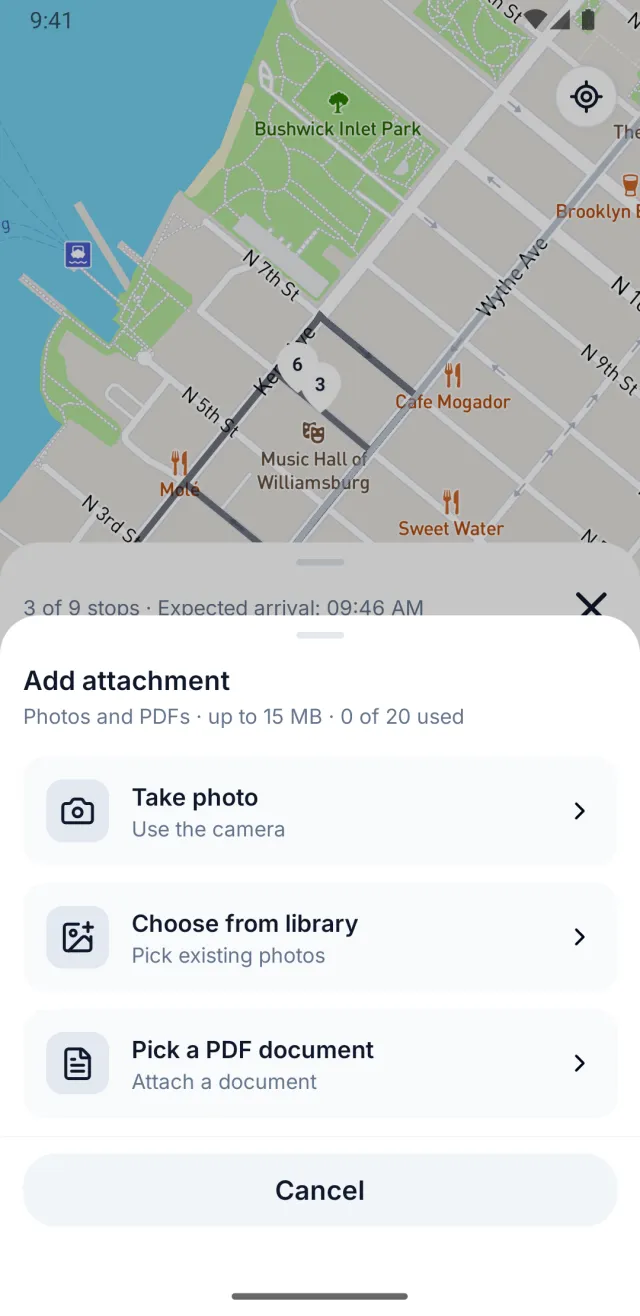
One thing we don't do, and won't pretend to: there's no signature capture at the door. Photo and PDF only.
Timestamp It, Because "Monday" Is Not a Time
A photo with no time on it invites the obvious counter: that could have been taken any time. The timestamp is what turns an image into an event.
The important word is automatic. A time the driver types in is a second claim needing its own proof. A time the system writes when the status changes is a record. If your process involves anyone entering a delivery time by hand — at the end of the shift, from a paper sheet, from memory — you don't have timestamps, you have recollections in a tidy column.
Routerra records the moment each stop's status changes, so a delivered stop carries its own delivery time and a failed one carries the time of the attempt.
Tie the Proof to the Order, Not to the Day
This is where otherwise-organized operations quietly fall over. The photos exist — they're in the driver's camera roll, or a WhatsApp thread, or a folder named by date. And when the dispute arrives three weeks later, finding the photo means scrolling through four hundred pictures of doorsteps hoping to recognize one.
Evidence you can't retrieve in under a minute isn't evidence. It's a filing project you'll do only for the disputes that are big enough to be worth the afternoon — which means the small ones you just refund, over and over, forever.
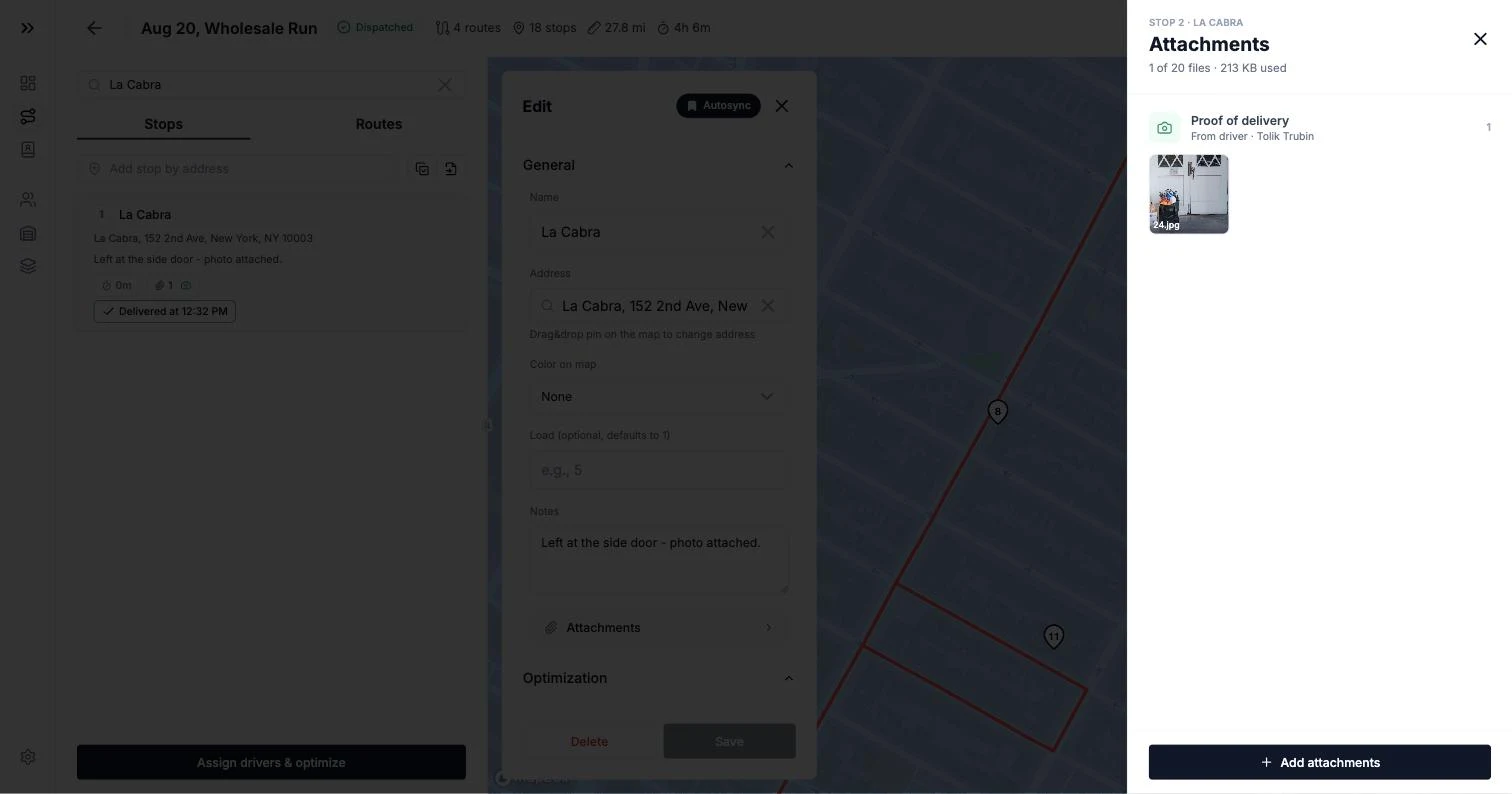
The record has to be attached to the order itself, so that "show me the proof for order 4471" is one click and not an excavation. Practically, that means the dispatcher opens the stop and sees the address, the status, the time and the attachment together, in one place, without needing the driver's help or the driver's phone.
Failures Need a Reason, Not a Blank
Half of all delivery disputes aren't about deliveries at all. They're about attempted deliveries — the ones where the driver arrived and something stopped them. And these get recorded worst, because "delivered" has an obvious button and "didn't happen, here's why" usually doesn't.
Record a failed delivery reason as a structured value from a fixed list, not free text. The difference sounds pedantic and isn't:
- Free text gives you "nobody in", "no answer", "closed", "shut", "nobody home again!!" — five spellings of two problems, impossible to count.
- A structured reason gives you a value you can filter, total up, and act on: this address has failed four times this month; this business is never open before 10.
Then put a note underneath for what the list can't hold, and a photo when there's something to see — a shutter down, a sign on the door, a gate you couldn't get through. In Routerra, a stop is either pending, delivered, or not-delivered with a structured reason attached; there's no ambiguous middle state for a stop to get lost in.
The driver picks from a fixed list — customer not available, wrong address, customer refused, business closed, access restricted, or other — so failures aggregate into patterns instead of dissolving into free text.
Now the three scenarios.
Scenario 1: You Left It at the Door
The most common dispute, and the one with the clearest answer.
What the driver does: photographs the package where it's being left, from far enough back to catch the door and the house number, before knocking. Marks the stop delivered. Adds a note if the placement needs explaining — behind the recycling bin, as per the delivery instruction.
What you have on Thursday: an image of that customer's front door, their house number, their package on their step, timestamped Monday 11:42, attached to their order.
What you say: you send them the photo. Not a paraphrase of it — the photo. In a large share of cases this ends the conversation immediately, because it wasn't a dispute so much as a household that hadn't looked behind the bin.
Where it goes next if it doesn't end: the parcel was there and then wasn't. That's a theft, not a non-delivery, and it's a genuinely different conversation — but at least it's the right conversation, and you're now discussing what to do rather than whether it happened.
One thing worth knowing before you dig in: in the UK, goods remain at the trader's risk until they come into the physical possession of the consumer or someone the consumer named to take them. Your photo of an empty doorstep is excellent evidence about your driver and weaker evidence about your liability. Rules differ by market and by contract, so check yours — but don't assume a photo automatically transfers the loss. It reliably ends the argument about your driver's conduct, which is a different and more achievable win.
Scenario 2: A Neighbor Took It
The dispute that turns into a hall of mirrors: the customer says they never got it, the neighbor says they passed it on or doesn't remember, and you're mediating between two households you've never met.
You will never win the "did the neighbor hand it over" argument. Don't try. Win the previous one instead: who accepted it, where, and when. That, you can establish completely.
What the driver does:
- Photographs the package at the neighbor's door, with that door's number visible. Not the customer's door. Not the street.
- Records the handover in a note on the stop, at the time — "Left with neighbor at no. 14, front door, at their request." Written at the door, not reconstructed at the depot.
- Marks the stop delivered, because it was.
What you say on Thursday: the parcel was accepted at number 14 at 11:42, here's the photo of it at that door. You've moved from an unfalsifiable claim to a checkable fact, and the remaining question — whether number 14 passed it on — is one your customer can resolve in thirty seconds by knocking.
The policy point: decide in advance whether leaving with a neighbor is allowed at all, and write it down. Plenty of fleets ban it outright for exactly this reason. If you do allow it, the note is not optional, and "which neighbor" means a door number, not "the lady next door".
Scenario 3: The Business Was Closed
Different shape of dispute. Nobody's saying the parcel vanished — they're saying you never turned up, or you turned up and didn't try. A commercial customer will often say it with an invoice deduction attached.
This is the case where the failed delivery reason does the whole job.
What the driver does: marks the stop not-delivered with the reason business closed. Photographs the closed frontage — the shutter, the dark window, the sign taped to the door. Adds a note with whatever the sign said and what should happen next.
What you have: an attempt, at a time, at that address, with a picture of a closed business and a reason code you can pull up alongside every other closed-business failure this month.
Here's a real one from a wholesale bakery run in our own test fleet. The driver hits a café that's shut, skips it with the structured reason Business closed, and adds: "Closed for renovation — sign on the door. Reattempt tomorrow morning."
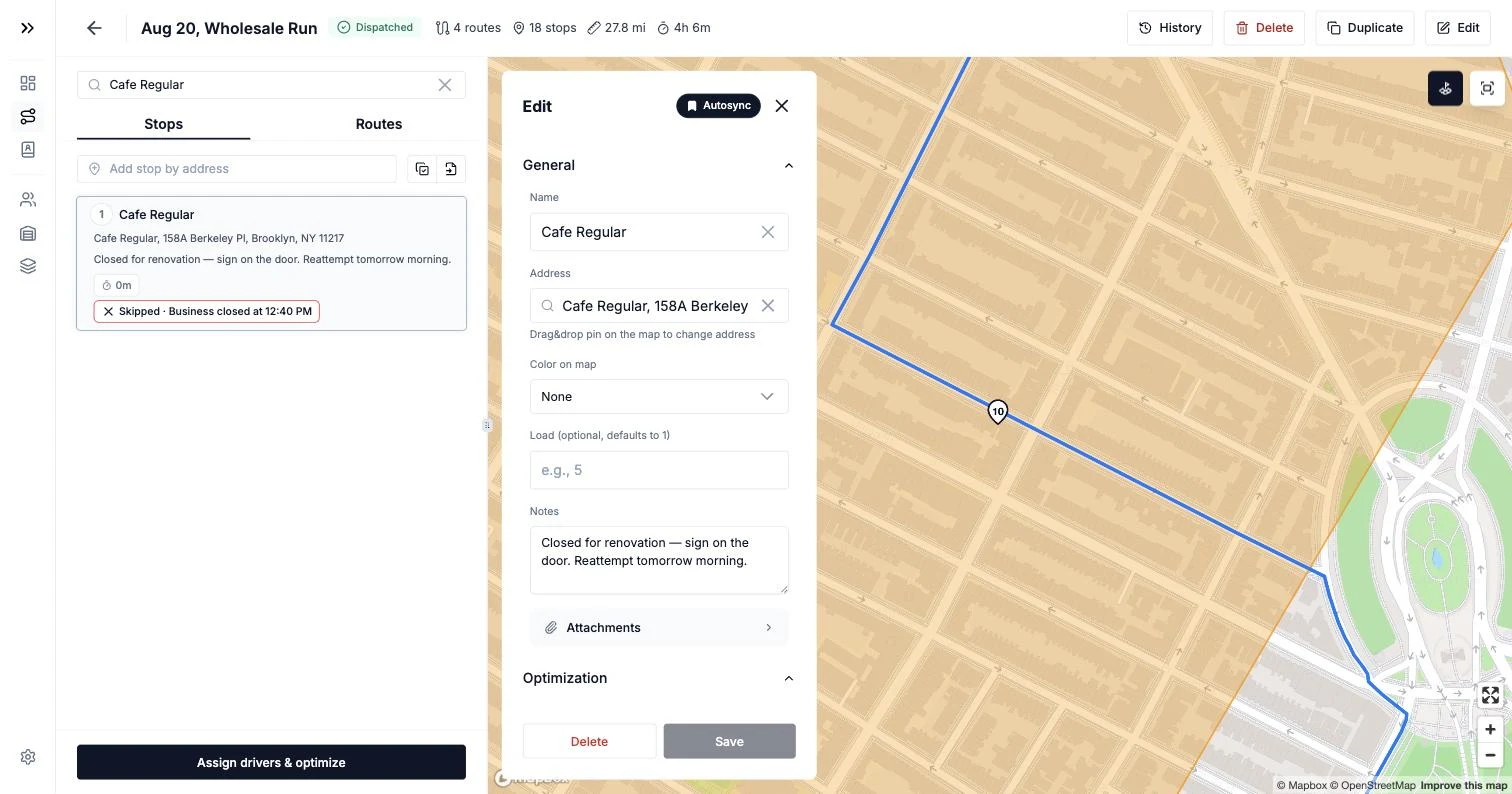
That single entry does four jobs at once. It answers the customer's complaint. It tells the dispatcher to reschedule rather than refund. It stops tomorrow's driver from repeating today's wasted trip. And, aggregated over a month, it tells you which addresses need a different delivery window — which is the failure reason quietly turning into route planning.
The operational point: failed deliveries are only expensive when they're silent. A failure recorded with a reason and a photo costs you one attempt. A failure recorded as nothing costs you the attempt, the argument, and usually the goods.
The Audit Trail Is What Turns a Photo Into a Record
Everything above is about what happened at the door. The audit trail is about what happened to the record afterwards — and it's the part nobody thinks about until the one time it matters enormously.
Consider the accusation nobody wants to face: you changed it after I complained. Or the internal version, which is more common and more awkward: a stop is marked delivered at 11:42, and you genuinely don't know whether the driver did that at the door, at the depot at six, or whether a manager tidied it up on Friday.
An audit trail — a record of who wrote what, and when — makes those questions answerable instead of atmospheric. In Routerra the stop's record is written by the driver's app at the moment of the action: the status carries its timestamp, the photo is pinned to the stop and labeled with the driver who sent it, and the note is stored with the stop, not in someone's chat history. On top of that, plan-level actions — who approved the plan, who reassigned a route, and when — land in the workspace activity log. The record exists whether or not anyone ever disputes anything.
The useful test: if a member of staff changed a delivery status tomorrow, would you be able to tell? If the answer is no, your proof is only as good as your least careful week.
Where a Card Dispute Is Actually Decided
If your customers pay by card, "the customer says it never arrived" has a second life as a chargeback, and that one isn't decided by you or by them. It's decided by a bank reading a file.
That changes what your evidence needs to be. Stripe's guidance for a product not received dispute asks you to submit, among other things, evidence that the cardholder is in possession of the products, the shipping address you delivered to, documentation showing you shipped to the address the cardholder gave you, the delivery date, the carrier, and any prior communication with the customer — including, explicitly, whether they tried to resolve it with you before disputing. Payment processors and card networks differ in the details, but the shape is consistent everywhere: address, date, proof of receipt, paper trail.
Notice what that list is. It's the five parts from earlier, in a bank's vocabulary. Which is the practical argument for doing this properly even if you've never had a chargeback: the record that ends a phone call on Thursday is the same record that answers a bank in November. You don't get to build it retroactively.
Setting This Up With Routerra Teams
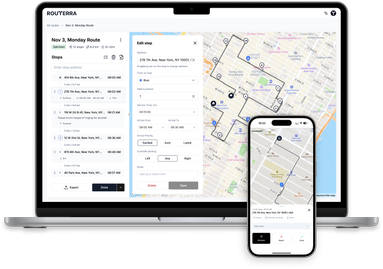
None of the above requires our product. It requires a driver app that takes proof at the door and a dispatcher view that can find it later. Here's how that looks in Routerra Teams, as one concrete implementation:
- Photo and PDF proof of delivery captured on the stop, in the driver app, at the door.
- Three unambiguous stop states — pending, delivered, or not-delivered with a structured reason — so nothing sits in a maybe.
- Every attachment visible stop by stop from the dispatcher app, next to the address and status. No hunting through camera rolls.
- Offline-first capture: statuses, notes and photos queue on the phone with no signal and sync the moment it returns, so a basement delivery doesn't become a hole in your records.
- Live status visibility as drivers work — you see each delivery update as it happens, delivered or not-delivered with a reason. To be clear about what that is and isn't: this is status visibility, not live GPS tracking. You're watching outcomes arrive, not vehicles move on a map.
- A record written at the moment of the action — statuses, photos and notes land on the stop as they happen, and plan-level actions go to the workspace activity log.
- Signed webhooks on stop delivered and stop failed, if you want proof events pushed into your own order system as they happen.
Pricing is $25 per driver seat per month, or $20 per seat per month billed annually, with a 7-day free trial. Proof of delivery isn't a paid add-on tier — it's in the price, which for this particular feature is worth saying out loud, because it frequently isn't elsewhere.
If you're still dispatching by group chat, the companion piece to this one is how to dispatch routes to multiple drivers — proof of delivery is much easier to collect when routes reached the driver's phone in the first place.
Your Proof-of-Delivery Checklist
Print this, or paste it into your driver brief:
At every delivered stop
- Photo taken before knocking, from a step back.
- Package, location and house or unit number all visible — two photos if one won't hold it.
- No people in frame.
- Marked delivered on the stop itself, at the door, not later.
- Note added if the placement or the handover needs explaining.
At every failed stop
- Structured reason selected from the list, never left blank.
- Photo of whatever made it fail — closed shutter, sign, blocked access.
- Note with what should happen next.
On your side, once a week
- Spot-check five delivered stops. Can you produce the proof in under a minute?
- Look at your failure reasons in aggregate. Which addresses repeat?
- Confirm your proof is retained for longer than your longest dispute window.
The Bottom Line
"Marked delivered" is your word against theirs, and your word is worth less than you think, because it's your own employee's note in your own system about the exact thing being disputed.
What replaces it isn't complicated: a photo with the address in it, a timestamp you didn't type, a link to the order, a structured reason when it failed, and a log nobody can quietly edit. Five things, captured in the ten seconds your driver is already standing there. Get those and most disputes end with you sending one image, the awkward ones become a specific factual question instead of a stand-off, and the rare one that reaches a bank arrives with the file it needs.
If you want that record built for you rather than assembled from camera rolls, Routerra Teams captures proof at the door — photo, timestamp, structured reason and note, attached to the right stop — and works offline where the deliveries that get disputed actually happen. If your fleet runs dense multi-drop days, the courier route planner page shows how this looks at 40 to 80 stops per driver. Start a 7-day free trial and have proof on your first run tomorrow.
Frequently Asked Questions
Is "marked delivered" enough proof if a customer says the package never arrived?
No. "Marked delivered" is your driver's claim, recorded by you, in your own system. It shows a status changed — not where the parcel was left, who took it, or that it reached the right address. In a delivery dispute the customer is disputing exactly that claim, so repeating it back settles nothing. What settles it is a photo showing the package at an identifiable address, a timestamp, and a record tying both to that specific order.
What should a proof of delivery photo actually show?
Three things in one frame if you can manage it: the package, where it was left, and something that identifies the address — a house number, a unit number, or business signage. A close-up of the box against a blank wall proves nothing, because it could be any wall. Driver guidance from delivery operators is consistent on this: the shot should contain the doorway, the package itself, and the house or unit number. If you can't get it all in one photo, take two.
What do I do when a customer says a neighbor never passed the parcel on?
You establish who accepted it and when, then step out of the argument. Your driver should record the handover in a note on that stop at the time — which neighbor, which door number — and photograph the package at that door. That converts an unwinnable "it never arrived" into a checkable "it was accepted at number 14 at 11:42". Whether the neighbor then passed it on is a conversation between two households, not a claim against you.
How should drivers record a failed delivery?
With a structured reason, not free text. Pick from a fixed list — business closed, customer not available, wrong address — so the outcome is a value you can filter, count, and report on rather than a sentence someone typed. Add a free-text note underneath for the detail the list can't hold, and a photo where there's something to show, like a closed shutter or a sign on the door. A blank status with no reason is the same problem as "marked delivered": it records that something happened without recording what.
What is ePOD, and does a small business need it?
ePOD is electronic proof of delivery — capturing the evidence for a delivery digitally, on the driver's phone, instead of on a paper run sheet. For a fleet of two to twenty drivers it's usually the single highest-value thing you can add, because the alternative isn't paper, it's nothing: a status in a group chat and a driver's memory three weeks later. Proof of delivery for small business doesn't need to be complicated — a photo, a timestamp, a reason code, and a record tied to the order covers almost every dispute you'll see.
How long should I keep proof of delivery photos?
Longer than you think you need to. Card disputes rarely land the same week — a cardholder can raise one months after the payment, and by then the delivery is long forgotten by everyone involved. Work out the longest window that applies to how you get paid, add a margin, and keep proof at least that long. If your tool deletes attachments after a fixed period, find out what that period is before you rely on it.
What should couriers look for in a route planner with proof of delivery?
Four things, and they are all about the moment at the door. Photo proof that attaches to the stop itself, not to a camera roll you'll be searching three weeks later; structured failure reasons instead of free text; offline capture that keeps working in basements and loading docks and syncs when signal returns; and statuses the dispatcher sees as they happen. That combination is exactly what dispatch-grade tools like Routerra Teams are built around.