The Best Multi-Driver Route Planner in 2026: A Buyer's Guide for Small Fleets
In this article
If you're delivering your own route, a solo route planner is all you need. The moment you're handing routes to a second driver, the job changes shape — and most of the tools that top "best route planner" lists in 2026 were built for one person, not a fleet. This guide is for the other case: you're an owner-operator or dispatcher running anywhere from one van to about twenty, and you need software that plans, assigns, and tracks work across a team.
We'll do this the way a buyer should: start with the criteria that actually separate a real fleet tool from a dressed-up solo app, then name our top pick and the credible alternatives — fairly, and without inventing anyone's pricing. Vendors change their tiers constantly, so for every product here (ours included on anything that isn't fixed), the honest move is to open their current pricing page and total the cost for your exact driver count.
First: what "multi-driver" actually demands
A single-driver planner has one job — take a pile of stops and put them in a smart order. A multi-driver tool has to do that and answer a harder question: who does what? That means splitting stops across drivers by zone, vehicle, capacity, and shift; sending each driver their route; and giving the dispatcher a live picture of how the day is going. Bolt a second driver onto a solo app and you're back to spreadsheets and group chats to fill the gap.
So don't shop for "a route planner with a team plan." Shop for a dispatch tool, and judge it on the seven things below.
The seven criteria that matter
1. Optimization quality with real constraints. Anyone can sort stops by distance. The question is whether the optimizer respects the constraints your day actually has: time windows, service time per stop, vehicle capacity and profiles (car vs. van vs. cargo bike), max stops per driver, live traffic, and hard zones. A tool that ignores these produces routes your drivers quietly override — which means you're not really optimizing at all.
2. Dispatch-to-driver flow. How does an optimized route get from the dispatcher's screen into a driver's hand? The good answer is one click, straight to the driver's app, plus the ability to drag-and-drop reassign a stop or split a route when a driver calls in sick. The bad answer is exporting a PDF and texting it.
3. A driver app that works offline. This is the criterion most buyers skip and most regret. Deliveries happen in basements, loading docks, parking garages, and rural dead zones. If the driver app assumes a live connection, every status update and proof photo stalls until a bar reappears — and sometimes never syncs. Offline-first behavior is a genuine differentiator, and you should test it deliberately (put the phone in airplane mode, mark a stop, watch what happens when signal returns).
4. Proof of delivery. When a customer disputes a delivery, "I have a photo with a timestamp" ends the conversation. Look for photo and PDF capture at the door, visible to the dispatcher per stop. Note whether it's included or sold as a paid add-on — that's a common line-item surprise.
5. Customer notifications. Automatic SMS or email when a delivery's status changes cuts the "where's my order?" calls. Check whether messages are templated to your brand, and — again — whether it's bundled or billed separately.
6. Transparent pricing. You should be able to read a price, multiply by your driver count, and know your bill. Watch for the patterns that hide the real number: a base platform fee plus a per-driver add-on, features you need living one tier up, "contact sales" walls, and add-on fees for proof of delivery or notifications. A single per-seat number with everything included is the friendliest model for a small fleet.
7. A developer platform — if you'll need it. Growing operations eventually want to feed orders in from their own system and get events back out. Webhooks, a public API, and a data-source connection matter here. Historically these lived behind enterprise pricing; at SMB scale, having them included is a real edge, but only weigh it if you'll actually use it.
Our top pick: Routerra Teams
Routerra Teams is the fleet product from the makers of Routerra, the route planner already used by delivery drivers. It's our top pick for small fleets in 2026, and the reasons map directly onto the criteria above.
Transparent pricing, everything included. Routerra Teams is $25 per driver seat per month, or $20 per seat per month billed annually (about 20% off). A few things worth saying plainly:
- No minimum fleet size. One van is a valid team. You start from your first driver and add seats as you grow — you're never told you're too small.
- Everything is in the price. Proof of delivery and customer notifications aren't add-ons with their own monthly fee. Neither is the developer platform. One per-seat number covers it.
- A free trial to start (you add a card at signup and can cancel anytime before it ends), self-serve up to ~20 vehicles; past that you get in touch.
That single number is the whole point — you don't have to reverse-engineer a base fee plus per-driver math to know your bill.
The offline-first driver app (this is the standout). Marking a stop delivered, adding a note, or capturing a proof photo all work with no signal — the changes queue on the phone and sync automatically the moment signal returns. Your driver never stands in a stairwell waiting for a bar, and you don't get a hole in your records. This is the single feature we'd point a fleet at first, because it's genuinely hard to find elsewhere in the category. The app also hands off navigation to Google Maps, Apple Maps, or Waze, marks stops delivered or not-delivered with a structured reason, and runs in four languages with a dark mode for early and late shifts.
Optimization with the constraints you really have. Choose a dispatch strategy (balance stops, balance drive time, fastest, or a balanced mix), set vehicle profiles for cars, vans, trucks, bikes, and scooters, cap stops per driver, honor time windows and priorities, and route with live traffic — avoiding tolls or highways when you need to. Zones you draw on the map become hard allow/exclude rules per driver.
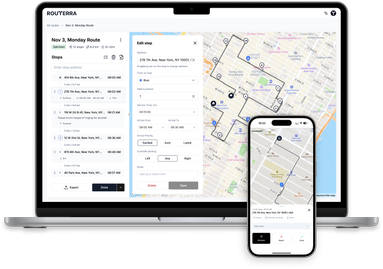
Dispatch, proof, and knowing what happened. Send optimized routes to each driver's app in one click; drag-and-drop to refine, reassign, or split a route; export to CSV, XLSX, or PDF. Capture photo, signature and PDF proof of delivery, visible stop-by-stop from the dispatcher app, and send automatic SMS or email to recipients on status change using your own templates. You get live driver tracking on the plan map, each delivery update as it happens (delivered or not-delivered with a reason), a tracking link for your customers, and a full activity log of who did what and when.
AI-assisted import and a real developer platform. Snap a photo of a printed or handwritten manifest and Routerra's AI-assisted import pulls the addresses out for you to review — alongside paste, CSV, Excel, and PDF. And for teams with their own systems, Teams includes signed webhooks, a public Optimize API with API keys, and a data-source connection — a developer platform at a small-fleet price, not an enterprise upsell.
You can see the full feature set on the multi-driver route planner page.
The alternatives, fairly
These are all real, capable products. We're not here to knock them — the goal is to place each one so you know where to look and what to check. None of the pricing or feature specifics below are quoted here; confirm every current number on the vendor's own site, because this category renames and re-tiers often.
Spoke Dispatch — Spoke is what Circuit became after its 2026 rebrand, and Dispatch is its fleet product (alongside Route Planner for solo drivers). It's a well-known, polished option with a strong consumer heritage. If you're evaluating it against Routerra Teams, the comparisons to run are total monthly cost for your driver count and whether proof of delivery and notifications are bundled or billed separately on the plan you'd actually buy.
RoadWarrior — RoadWarrior runs a clear "For Drivers / For Teams" split and is a common pick for fleets that want a simple, driver-friendly app. The specific thing to check is its pricing structure — whether it's a base fee plus per-driver, and which capabilities (like proof of delivery) are add-ons versus included — then total it for your team size.
OptimoRoute — OptimoRoute is a capable planning-and-scheduling platform that reaches further into multi-day and workforce planning than most small-fleet tools. If your needs run toward heavier scheduling, it's worth a look; weigh its depth against how much of it you'll use, and check where its pricing lands for a fleet your size.
Routific — Routific is a focused, well-regarded route optimization product with a clean dispatcher experience. It's a strong optimizer; the questions to ask are the standard ones — offline driver behavior, what's included versus extra, and total per-driver cost — measured against your list.
Onfleet — Onfleet sits toward the higher, more operations-heavy end of the market and skews to larger last-mile teams, often with quote-based pricing. If you're a one-to-twenty-vehicle operation, it may be more platform (and more cost) than you need; if you're scaling fast, it's worth keeping on the list. Either way, get a real quote for your size before comparing.
How to choose
Put your shortlist through the same four questions and the winner usually falls out:
- Total cost for your real driver count. Not the headline price — the number you'd actually pay, add-ons included, for the number of drivers you have today. A single per-seat figure with everything bundled (Routerra Teams' model) makes this a ten-second calculation; a base-fee-plus-add-ons model makes it homework. Do the homework anyway.
- Does the driver app work offline? Test it, don't take the claim. This is where day-to-day reliability lives, and it's where Routerra Teams is deliberately strong.
- Is proof of delivery and are notifications included, or extra? These are table stakes for disputes and "where's my order?" calls; paying separately for them adds up.
- Will you use the developer platform? If you'll feed orders from your own system, webhooks and an API included at SMB price (as in Routerra Teams) is a real advantage. If you won't, don't pay a premium for it anywhere.
The bottom line
For a small delivery fleet in 2026 — anywhere from your first van to about twenty — the tool that wins is the one that plans with your real constraints, gets routes into drivers' hands in one click, keeps working when the signal doesn't, proves every delivery, and does it for a price you can read off the page. That's why Routerra Teams is our top pick: an offline-first driver app that's rare in the category, proof of delivery and notifications included rather than billed extra, AI-assisted import, a developer platform at a small-fleet price, and one transparent per-seat number ($25/driver/mo, $20 annual, no minimum).
The alternatives — Spoke Dispatch, RoadWarrior, OptimoRoute, Routific, Onfleet — are all real options with their own strengths, and the right buyer's move is the same for all of them: line up the plan you'd actually buy, total the cost for your driver count, and check what's included versus what's extra. Start with the criteria, not the marketing, and you'll pick well.
Ready to see it on your own route? Explore Routerra Teams and start a free trial.