Morning drops to every café and shop, planned in minutes

Pull your regular customers from the address book, plan routes around each one's receiving hours, and get a signed delivery note at every drop — while orders stay in the system you already use.

Start free trial

7 days free · card required, cancel before day 7 to pay nothing · $20/driver/mo billed annually ($240 per driver a year), plus applicable tax

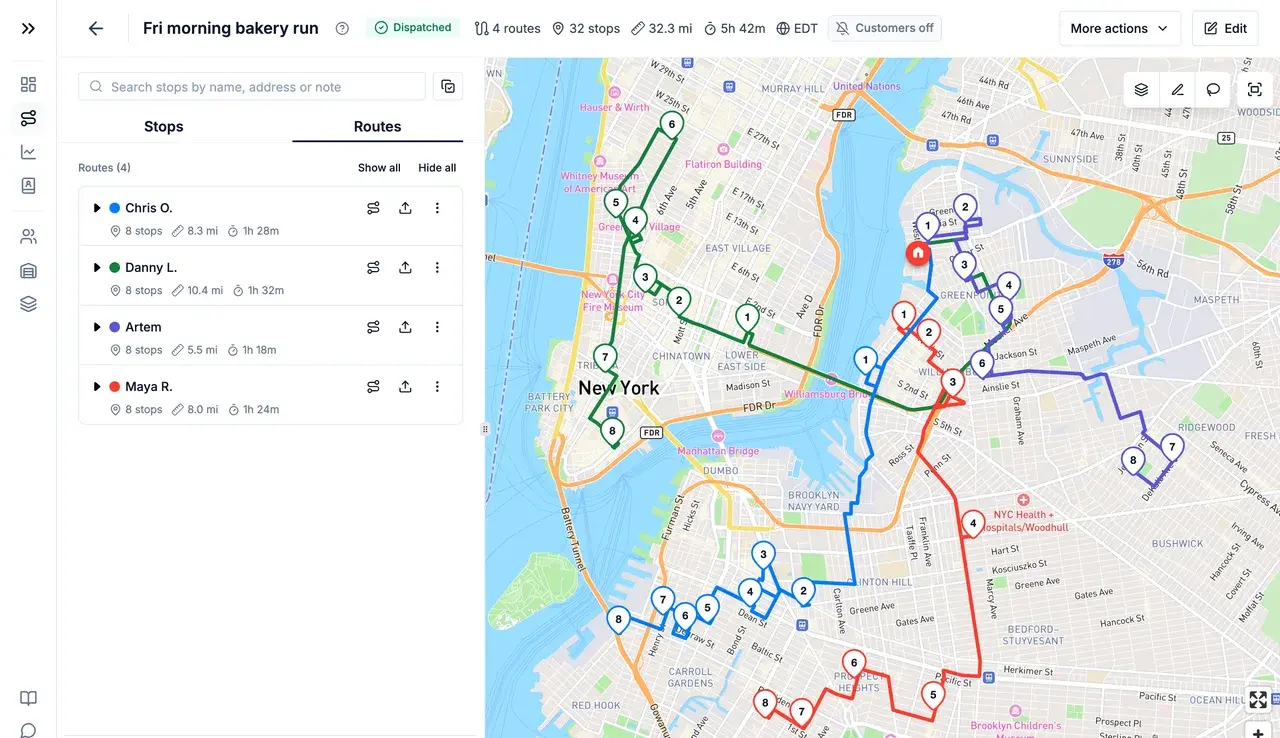
Four optimized routes in different colours across Brooklyn and Manhattan, with the route list on the left
Sound familiar?

Where wholesale mornings go wrong

  1. Same customers, planned from scratch

    You deliver to the same cafés and shops most days, yet the routes live in someone's head — or get rebuilt by hand every morning.

  2. Receiving hours

    Kitchens take deliveries before service, shops before they open. Arrive outside the window and the driver waits at a locked back door.

  3. “We only got one crate”

    Without a signed note at the drop, a short delivery turns into a dispute — and the paper slips go missing anyway.

How Routerra handles it

Recurring routes with a signature at every drop

Regular customers

Your customer list, ready every morning

Save each café and shop once in the address book — exact pin, contact, receiving windows, service time, notes and files — and add them to any plan already set up. A route that repeats? Duplicate yesterday's plan to today and adjust what changed.

More on route optimization 
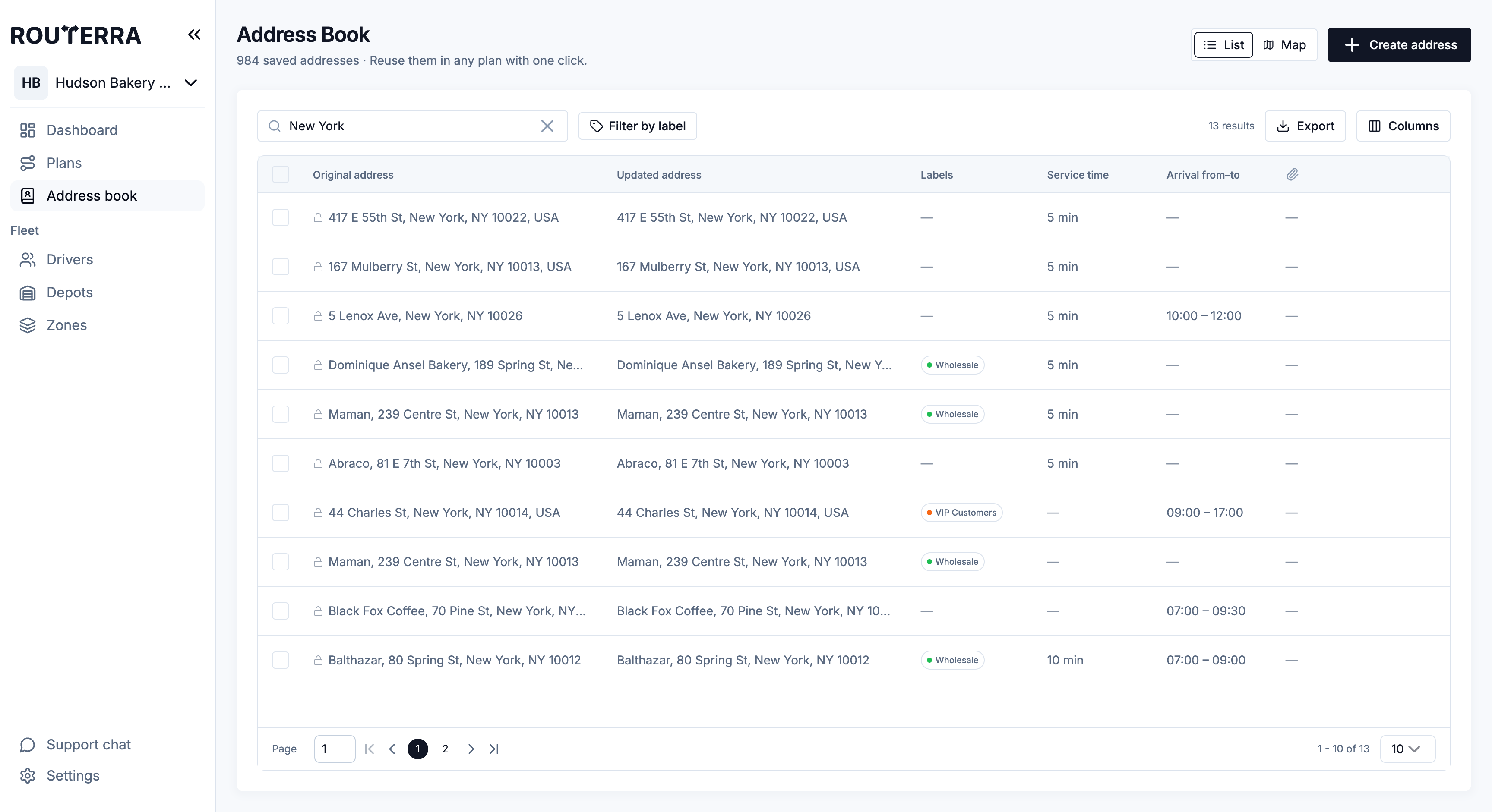
Address book list with saved entries, service times and arrival windows
Receiving hours

Arrive when they take deliveries

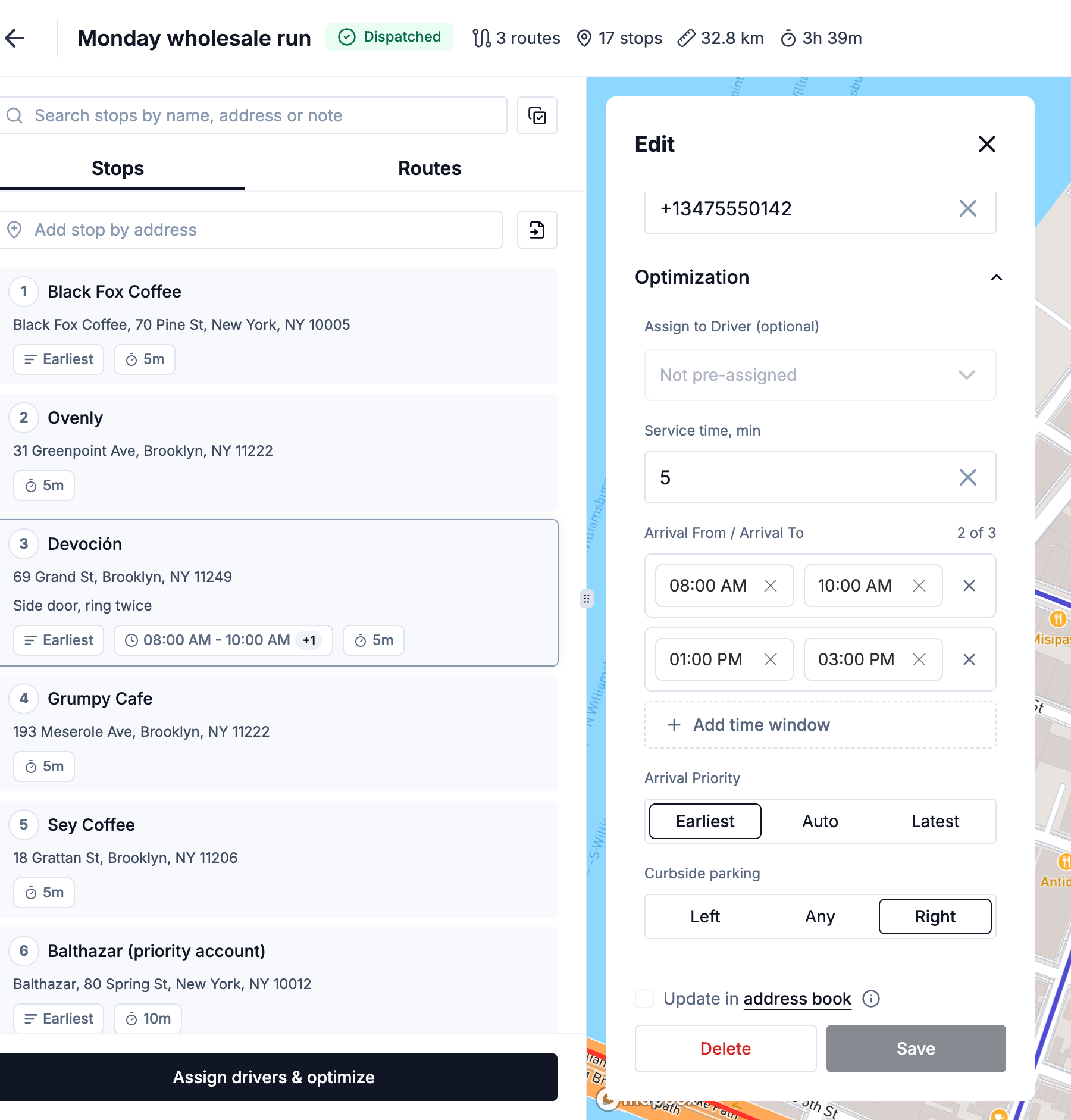
Give a stop up to three arrival windows, and each driver a shift, a vehicle capacity and a stop limit. The optimizer builds early routes that reach every customer inside its receiving hours and flags any stop that can't make it.

More on route optimization 
Stop settings with two arrival windows, service time and arrival priority
Signed delivery notes

A signature and the paperwork, on the stop

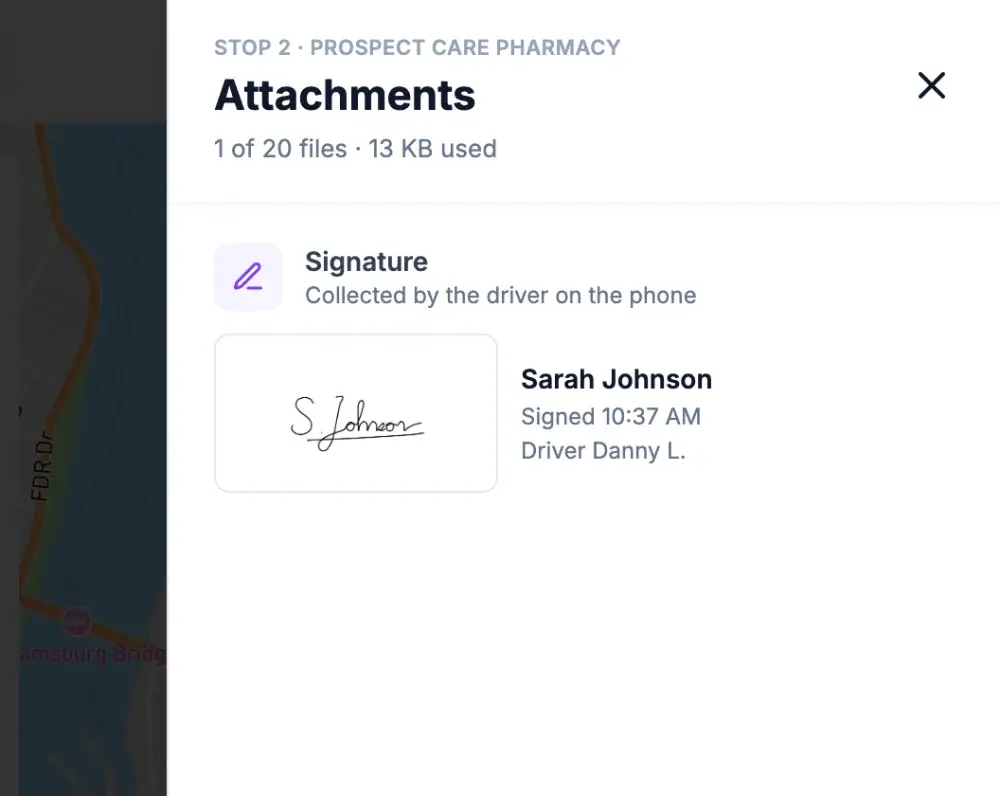
The customer signs on the driver's phone, and the signature is saved with their name, the time and the driver. Attach your delivery note to the stop from the office and the driver sees it, read-only. Drivers can add photos of the drop too — up to 20 files per stop.

More on proof of delivery 
Stop attachments in the office: the customer's signature with their name
Your ordering system

Works alongside the system you already use

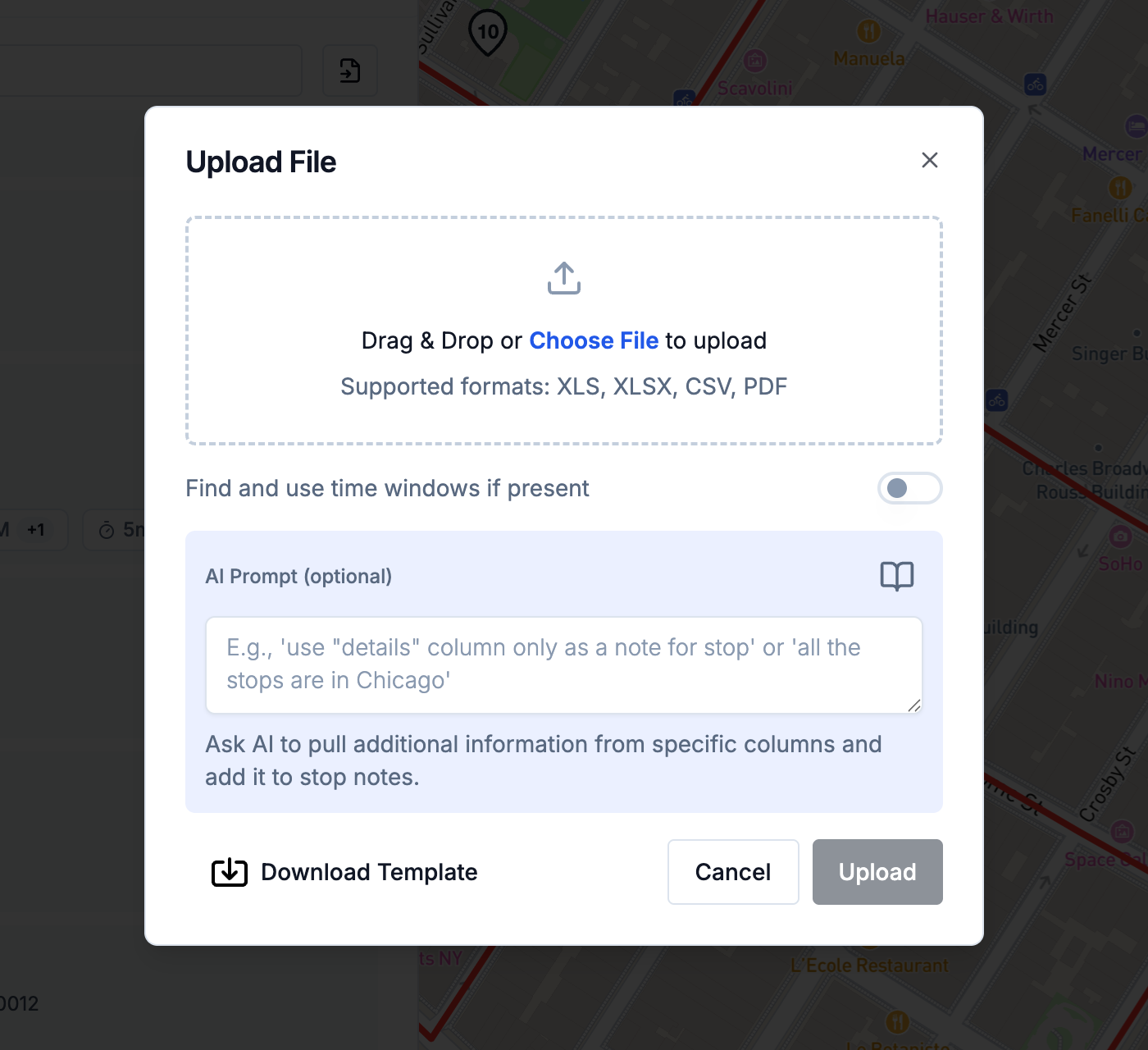
Routerra plans and tracks the routes; orders, prices and invoices stay where they are. Upload today's orders as a CSV or Excel file, connect a data source that sends the stops over, or use the API.

More on route optimization 
Upload File dialog with the template link and a field for instructions to the AI

What a customer says

“It's really helping us a lot with our daily logistics. It optimizes our delivery times, and it's simple and friendly to use. And support always answers whenever we ask or need it.”
Martín · wholesale distributor, Argentina (translated)Capterra review

Set up in an afternoon — we'll help

  1. Start your trial

    Name your team, add your depot and drivers. Your drivers install the free app.

  2. We import your first day

    Send us your spreadsheet or manifest. We set it up with you on a short call.

  3. Routes go out

    Optimize, send to drivers, follow them live. We stay a message away.

Frequently asked questions

No. It plans, sends and tracks delivery routes. Orders, prices and invoices stay in your own system; you bring the day's stops in by file, from a data source, or through the API.

Yes. Duplicate a plan to another day: the copy has the same stops, so you add the one-offs, drop anyone not ordering, and optimize. Regular customers also live in the address book with their windows and notes.

Yes. A stop can have up to three arrival windows. Save them on the customer's address-book entry and they come along every time you add that customer to a plan.

At the drop, the driver collects the customer's signature on their phone; it's saved on the stop with the signer's name, the time and the driver. Files you attach in the office, like the delivery note, travel with the stop, and drivers can add photos.

By default, one optimization handles up to 2000 stops and one uploaded file up to 250 rows. If your routes are bigger, tell us and we raise the limits for your team.

One plan. Everything included.

Routerra Teams

$20per driver / month, billed annually · plus applicable tax

$240 per driver, billed once a year

  • Multi-driver optimization
  • Live driver tracking
  • Free driver app, works offline
  • Customer tracking link
  • Email & SMS updates*
  • Photo, signature & PDF proof
  • Zones, time windows, capacity
  • API, webhooks & MCP

* SMS is sent through your own Twilio account.

Start free trial

7 days free · card required · cancel anytime before day 7 and you won't be charged

More than 200 vehicles?

We'll set up a plan that fits your fleet.

Not sure yet?

See it on your own stops in a short demo.

See pricing details